Setup Implement Sections
-
Initial implement width may be entered into the implement width
input box. The width entered is evenly distributed among the sections.
- If implement sections are different widths or associated switches are different, select setup sections button and follow on screen instructions. Fence row nozzles are also included under setup sections.
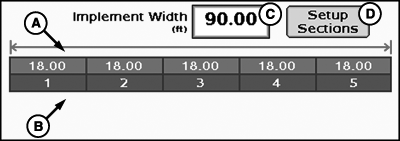
PC12973-UN-27OCT10
Setup Sections
A - Implement Section Widths
B - Associated Switchbox Switch Numbers
C - Implement Width Input Box
D - Setup Sections Button
To setup implement sections:
NOTE: It is recommended that the section valve type be determined prior to completing section setup.
NOTE: Switchbox information will be hidden when no switchbox is connected.
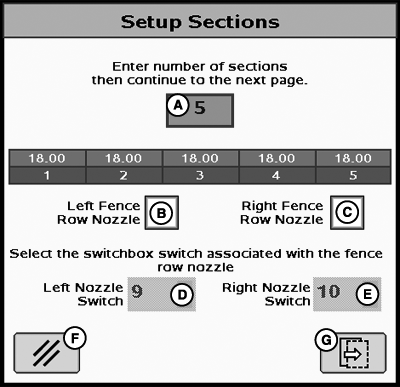
PC11278-UN-17SEP08
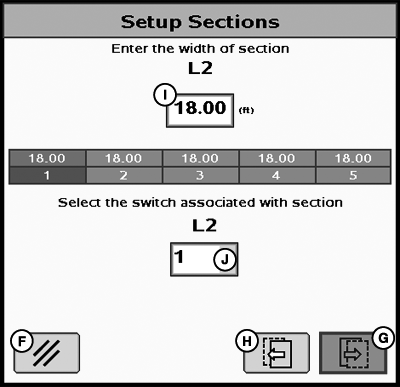
PC11279-UN-17SEP08
A - Number of Sections Input Box
B - Left Fence Row Nozzle Enable/Disable
C - Right Fence Row Nozzle Enable/Disable
D - Left Fence Row Nozzle Switchbox Switch Association Drop-Down Menu
E - Right Fence Row Nozzle Switchbox Switch Association Drop-Down Menu
F - Cancel Button
G - Next Page Button
H - Previous Page Button
I - Width of Section Button
J - Switchbox Switch Number Association Drop-Down Menu
-
Enter number of sections.
-
Select fence row nozzle enable/disable check boxes as required.
-
Indicate switch number associated with each fence row nozzle.
-
Select page forward to enter each individual section width and associated switch box number.

PC11335-UN-01OCT08
A - Dual Boom ON/OFF Check Box
B - Dual Boom Activation Input Box
Dual Boom
Dual boom allows for a second rank of nozzles to activate when high speeds and/or application rates are required. This allows for pressure and nozzle pattern to remain consistent.
To setup Dual Boom:
-
Select the Dual Boom ON/OFF check box (A) to enable Dual Boom.
-
Enter speed value in the Dual Boom Activation input box (B). When speed value is reached, Dual Boom becomes active.
NOTE: Dual Boom is only available for sprayers with 3-wire section valve type.
If current speed is above threshold indicated, the Dual Boom will be activated. When speed drops 10% below value, Dual Boom will be deactivated.
|
CZ76372,00001ED-19-20101027 |