Main Screen Indications
NOTE:
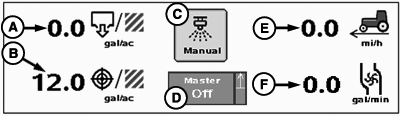
PC12332-UN-14OCT09
Main Screen Indications
A - Actual Rate
B - Target Rate
C - Manual Spray Button
D - Master Switch Indicator/Implement Height Switch Indicator
E - Travel Speed
F - Flow (Volume per Time)
Pressure (F): Pressure from pressure sensor 1 will be displayed instead of flow if system is configured for a pressure sensor.The Manual Spray button (C) will force the controller to apply product at the present application rate, or the minimum flow rate (whichever is greater). It will override Swath Control Pro and vehicle speed threshold for a duration of five seconds when pressed. A countdown indicator will appear when this function is enabled. It may be pressed any time during the countdown period to reset the counter back to five seconds. Minimum flow rate will be controlled until speed and target rate warrant a higher flow rate. The Manual Spray button will be disabled if the minimum flow rate is zero.
The height switch indicator may be either in an up or down position to give a visual indication relative to the implement.
NOTE: To verify the height switch operates correctly, raise and lower the implement while observing the height switch indicator.
|
CZ76372,00001F1-19-20101103 |