Implement Section States
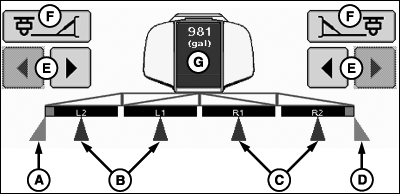
PC11338-UN-10SEP09
Implement Sections Spraying
A - Left Fence Row Nozzle Active
B - Left Sections Active
C - Right Sections Active
D - Right Fence Row Nozzle Active
E - Section ON/OFF Buttons
F - Fence Row Nozzles ON/OFF Buttons
G - Tank Level/Tank Refill
- Off—Section is off.
- Enabled—Section is enabled.
- Active—Section is spraying.
Implement sections can be in one of three states:
Section on/off buttons (E) enable or disable one section at a time from left to right or right to left. The operator can also enable/disable sections with the switch box in the cab.
The fence row nozzle buttons (F) enable or disable the fence row nozzles. The operator can also enable/disable fence row nozzles with the switch box in the cab.
Active sections have blue fill color triangle indication under the section.
Enabled fence row nozzles have purple fill colored indication.
Section and fence row nozzles have colored triangle indications under implement sections to show active status.
Enabled sections have black fill color indication. Sections that are in the off state will be clear.
Active fence row nozzles will have purple fill color triangle indication under the implement section.

PC11273-UN-17SEP08
Implement Section States
Dual BoomOpen triangles indicate dual boom is configured, but not spraying. Light blue triangles indicate dual boom is spraying.
|
CZ76372,00001F2-19-20101027 |