Setup Implement Sections
-
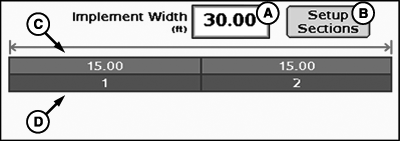
Initial implement width may be entered into the implement width
input box. The width entered is evenly distributed among the sections.
-
If implement sections are different widths or associated switches
are different, select setup sections button and follow on screen instructions.
NOTE: It is recommended that the section valve type be determined
prior to completing section setup.
NOTE: Switchbox information will be hidden when no switchbox is connected.
PC12983-UN-28OCT10
Implement Selection
A - Implement Width Input Box
B - Setup Sections Button
C - Implement Section Widths
D - Associated Switchbox Switch Numbers
To setup implement sections:
PC11386-UN-09OCT08
PC11387-UN-09OCT08
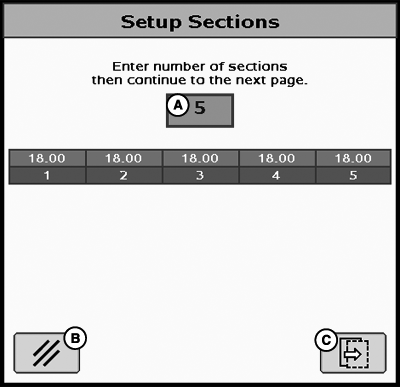
A - Number of Sections Input Box
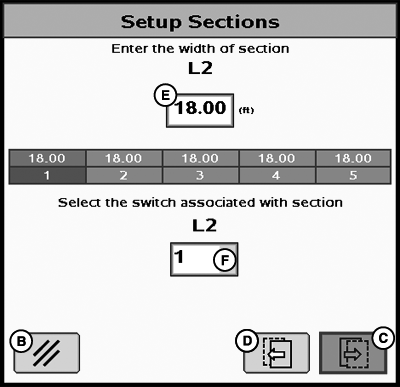
B - Cancel Button
C - Next Page Button
D - Previous Page Button
E - Width of Section Input Box
F - Switchbox Switch Number Association Drop-Down Menu
-
Enter number of sections.
-
Select next page to enter each individual section width and associated switch box number.
|
CZ76372,00001FA-19-20101028 |