System Setup
PC12984-UN-28OCT10
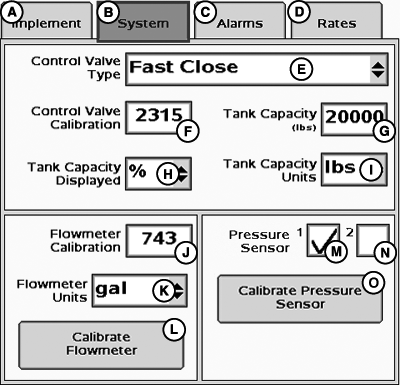
System Setup Page
A - Implement Tab
B - System Tab
C - Alarms Tab
D - Rates Tab
E - Control Valve Type Drop-Down Menu
F - Control Valve Calibration Input Box
G - Tank Capacity Input Box
H - Tank Capacity Displayed Drop-Down Menu
I - Tank Capacity Units Drop-Down Menu
J - Flowmeter Calibration Input Box
K - Flowmeter Units Drop-Down Menu
L - Calibrate Flowmeter Button
M - Pressure Sensor 1 Enable/Disable
N - Pressure Sensor 2 Enable/Disable
O - Calibrate Pressure Sensor Button
Select Systems tab to enter system setup.
|
CZ76372,00001FB-19-20101028 |