Main Screen Indications
NOTE:
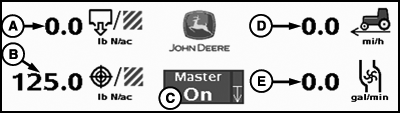
PC12998-UN-02NOV10
Main Screen Indications
A - Actual Rate
B - Target Rate
C - Master Switch Indicator/Implement Height Switch Indicator
D - Travel Speed
E - Flow (Volume per Time)
Pressure (E): Pressure from pressure sensor 1 will be displayed instead of flow if system is configured for a pressure sensor.The height switch indicator may be either in an up or down position to give a visual indication relative to the implement.
NOTE: To verify the height switch operates correctly, raise and lower the implement while observing the height switch indicator.
|
CZ76372,00001FF-19-20101103 |