Implement Selection
-
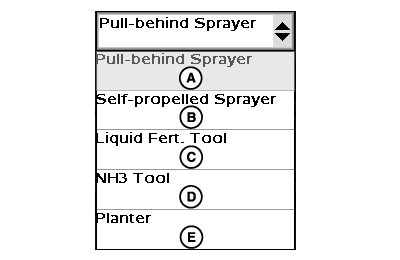
PC10477-UN-01SEP07Implement Type Drop-Down Menu
A - Pull-Behind Sprayer
B - Self-Propelled Sprayer
C - Liquid Fertilizer Tool
D - NH3 Tool
E - Planter
Select planter from the implement type drop-down menu. - Select implement name from drop-down menu.
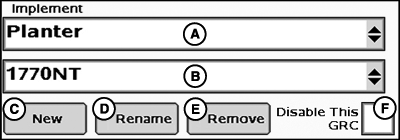
PC12990-UN-28OCT10
Implement Selection
A - Implement Drop-Down Menu
B - Implement Name Drop-Down Menu
C - New Button
D - Remove Button
E - Remove Button
F - Disable Rate Controller Check Box
- Select new.
- Type new name on keypad.
- Select enter.
If no name has been added yet:
- Select implement name to be revised from drop-down.
- Select rename.
- Type new name on keypad.
- Select enter.
If name needs to be revised:
- Select implement name to be deleted from drop-down.
- Select remove.
- Accept pop-up notification.
If equipment name is no longer needed:
NOTE: A maximum of three implement configurations/names may be saved per controller.
NOTE: If GreenStar Rate Controller will not be used but remain connected, check Disable This GRC check box to eliminate connection to display for Documentation, Swath Control, and controller warnings.
|
CZ76372,0000206-19-20101028 |