Setup Planter Sections
-
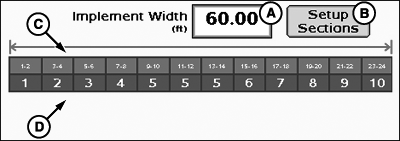
Initial implement width may be entered into the implement width
input box. The width entered is evenly distributed among the sections.
- If implement sections are different widths or associated switches are different, select setup sections button and follow on screen instructions.
PC12991-UN-28OCT10
Setup Sections
A - Implement Width Input Box
B - Setup Sections Button
C - Implement Section Widths
D - Associated Switchbox Switch Numbers
To setup implement sections:
|
CZ76372,0000207-19-20101028 |