SeedStar ™ Generation 2 Planters
Some planters may be equipped with SeedStar Gen 2. The GreenStar Rate Controller will automatically recognize SeedStar Gen 2 is present.
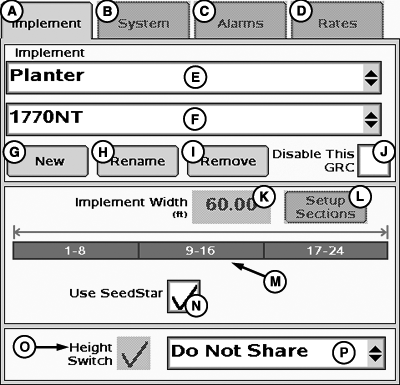
PC12992-UN-28OCT10
Default SeedStar Configuration
A - Implement Tab
B - System Tab
C - Alarms Tab
D - Rates Tab
E - Implement Type Drop-Down Menu
F - Implement Name Drop-Down Menu
G - New Implement Button
H - Rename Implement Button
I - Remove Implement Button
J - Disable Rate Controller Check Box
K - Implement Width Input Box
L - Setup Sections Button
M - Implement Sections
N - SeedStar ON/Off Check Box
O - Height Switch Check Box
P - Height Switch Message Drop-Down Menu
The Implement Setup page for SeedStar Gen 2 planters will include an extra check box on the bottom of the page labeled “USE SEEDSTAR” The box has a check in it by default. With this box checked, the GreenStar Rate Controller will use setup information from the SeedStar Gen 2 Controller.NOTE: In order for the GreenStar Rate Controller to recognize the SeedStar Gen 2 and use its configuration information, it must be connected to the CAN bus and running when the GreenStar Rate Controller planter configuration is created.

PC10537-UN-13SEP07
Custom SeedStar Configuration
A - Use SeedStar Check Box
To customize the SeedStar 1 configuration, remove the check from the box and setup the sections manually.
PC10534-UN-13SEP07
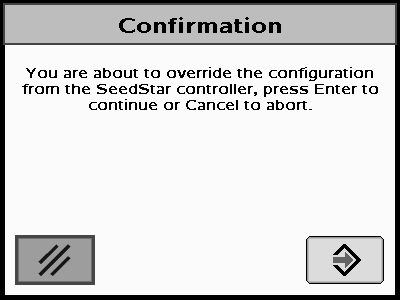
SeedStar Confirmation
When disabling SeedStar, a confirmation screen will appear.SeedStar Confirmation— You are about to override the configuration from the SeedStar controller, select Enter to continue or Cancel to abort.
Select enter to continue.
Refer to SETUP PLANTER SECTIONS.
|
SeedStar is a trademark of Deere & Company |
CZ76372,0000209-19-20101028 |