Implement Rate Control
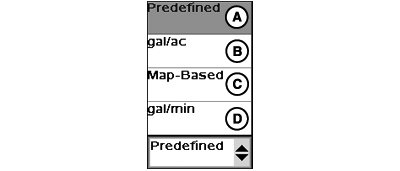
PC12550-UN-09APR10
Rate Selection Drop-Down Menu (US Units)
A - Predefined
B - gal/ac (US Units)
C - Map-Based
D - gal/min (US Units)
Choose one of three available rate types.

PC12551-UN-09APR10
Predefined Rates
A - Rate Selection Drop-Down Menu
B - Predefined Rate 1
C - Predefined Rate 2
D - Predefined Rate 3
Predefined rates are limited to a maximum of three. These rates can be set up on the setup page under rates tab.The letters located on the top left corner of each Rate button (B, C, D) represent the short-cut buttons that are available when using a Display Control. For additional information on a Display Control, refer to the GS2 Basics Operator's Manual >> Getting Started Section.

PC12552-UN-09APR10
Rate Based on Volume
A - Rate Selection Drop-down Menu
B - Decrease Rate Button
C - Rate Input Box
D - Increase Rate Button
A Rate based on volume per unit of area can be set by choosing one of the below items from the rate selection drop-down menu. This rate mode will ensure a consistent application rate per acre as working width and vehicle speed are adjusted.- gal/ac (US Units)
- L/ha (Metric Units)
- I Gal/ac (Imperial Units)

PC11380-UN-10SEP09
A - Rate Selection Drop-Down Menu
In order to run map-based rates, a prescription must be selected in GS2 Documentation. Map-based only appears in the drop-down if a prescription selected.

PC12553-UN-09APR10
Rate Based on Flow
A - Rate Selection Drop-down Menu
B - Decrease Rate Button
C - Rate Input Box
D - Increase Rate Button
A Rate based on flow can be set by choosing one of the below items from the rate selection drop-down menu. This rate mode will ensure a constant flow rate regardless of changes in vehicle speed. A decrease in rate maybe visible when sections are disabled.- gal/min (US Units)
- L/min (Metric Units)
- I Gal/min (Imperial Units)
|
JS56696,0000703-19-20091014 |