Rates Setup
PC12614-UN-12MAY10
Rates Setup
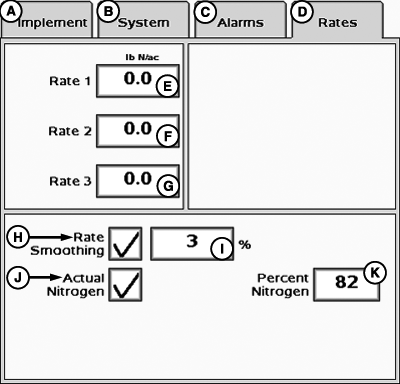
A - Implement Tab
B - System Tab
C - Alarms Tab
D - Rates Tab
E - User Rate 1 Input Box
F - User Rate 2 Input Box
G - User Rate 3 Input Box
H - Rate Smoothing Check Box
I - Percent Smoothing Input Box
J - Actual Nitrogen Check Box
K - Percent Nitrogen Input Box
Select Rates tab to enter Rates setup.Up to three target rates may be defined on this page by entering a value into the input box. Values entered on this page will be available on the home page.
Rate Smoothing shows the actual rate as the target rate when the actual rate is within the user defined percentage. Rate Smoothing percentage range is 3—15%.
When Actual Nitrogen is enabled, the Percent Nitrogen input box will appear. Entering a percent Nitrogen value converts application rates to mass of Nitrogen rather than mass of total product applied.
|
JS56696,0000723-19-20091014 |