Setup Planter Sections
-
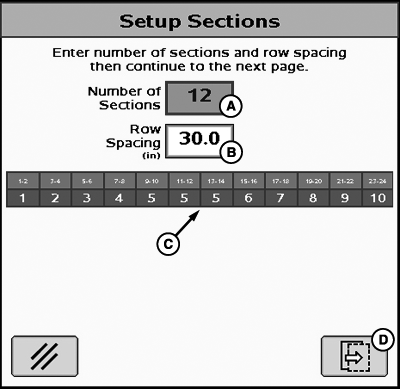
PC11292-UN-18SEP08Setup Sections
A - Number of Sections Input Box
B - Row Spacing Input Box
C - Sections
D - Next Page
Enter the number of sections on the planter. -
Enter the row spacing distance.
- Select the next page button.
-
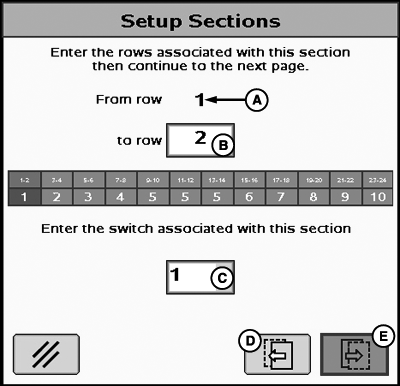
PC11293-UN-18SEP08Setup Sections
A - From Row
B - To Row Input Box
C - Switchbox Switch Association menu
D - Previous Page
E - Next Page
Enter the rows associated with each section by inputting a row number into input box (B). For example, entering a value of 2 will designate rows 1 and 2 as the first planter section. -
Select the associated switchbox switch number from the drop
down menu.
- Define the remaining sections by pressing the next page button and entering the row numbers into the input box.
|
JS56696,0000740-19-20100513 |