Calibrate Pressure Sensor
PC13002-UN-04NOV10
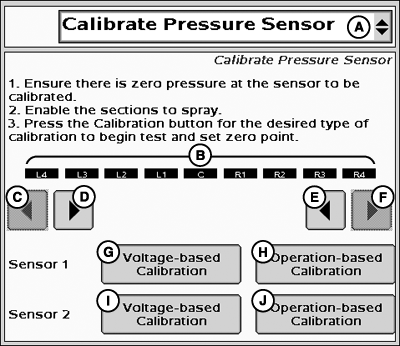
Calibrate Pressure Sensor
A - Tests Drop-Down Menu
B - Enabled Sections
C - Left Sections Off
D - Left Sections ON
E - Right Sections ON
F - Right Sections OFF
G - Sensor 1 Voltage-based Calibration
H - Sensor 1 Operation-based Calibration
I - Sensor 2 Voltage-based Calibration
J - Sensor 2 Operation-based Calibration
The Calibrate Pressure Sensor option is only available in the Tests drop-down menu when at least one Pressure Sensor Enable/Disable box is checked on the Setup >> Systems Tab.There are two options for calibrating a pressure sensor. The Operation Based Calibration requires that two calibration points be entered and is used when the slope of the pressure sensor is not known. The Voltage Based Calibration can be used when the slope of the pressure sensor is known and only requires a zero point.
-
Ensure there is zero pressure at the sensor to be calibrated.
-
Enable the sections to spray.
- Press the Calibration button for the desired type of calibration to begin test and set zero point.
PC12999-UN-04NOV10
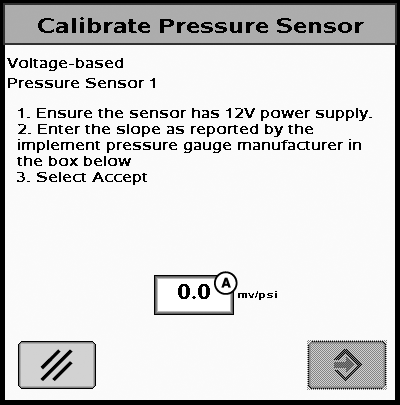
A - Sensor Slope Input Box
Voltage-based Calibration
-
Ensure the sensor has 12V power supply.
NOTE: Check with sensor manufacturer to ensure that sensor can
accept 12V power.
-
Enter the slope as reported by the implement pressure gauge
manufacturer in the box below.
- Select Accept.
NOTE: Sensor power can be connected to the ECU Power pin (pin 26 of 37-pin connector) to provide 12V.
NOTE: For Raven pressure sensors with a 12V power supply the slope will be 16 mV/psi.
PC14158-UN-02NOV11
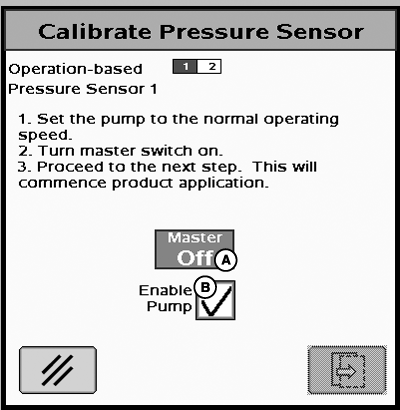
Calibrate Pressure Sensor
A - Master Switch Indicator
B - Enable Pump Checkbox
Operation-based Calibration
-
Set the pump to the normal operating speed.
-
Turn master switch on.
-
Check Enable Pump checkbox (B) if it is displayed.
NOTE: Enable Pump checkbox (B) will only be displayed if control
valve type is PWM and Pump Enable checkbox was selected in PWM settings.
- Proceed to the next step. This will commence product application.
PC13001-UN-04NOV10
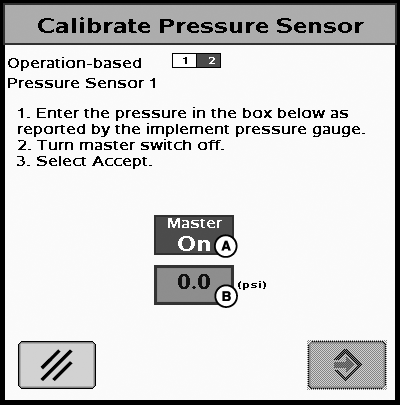
Calibrate Pressure Sensor
A - Master Switch Indicator
B - Pressure Input Box
-
Enter the pressure in the box below as reported by the implement
pressure gauge.
-
Turn master switch off.
-
Select Accept.
NOTE: The system will spray for 30 seconds maximum. Once the
system has stabilized the value from the gauge, it must be entered
during this period of time.
|
BA31779,00002B8-19-20111110 |