Calibrate PWM Limits
PC14159-UN-03NOV11
Calibrate PWM Limits
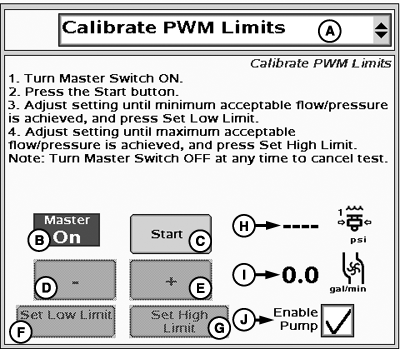
A - Tests Drop-Down Menu
B - Master Switch Indicator
C - Start Button
D - Decrease Button
E - Increase Button
F - Set Low Limit Button
G - Set High Limit Button
H - Pressure
I - Flow
J - Enable Pump
NOTE: Turn Master Switch OFF at any time to cancel test.
-
Turn Master Switch On.
-
Check Enable Pump (J) if it is displayed.
NOTE: Enable Pump (J) will only be displayed if control valve
type is PWM and Pump Enable checkbox was selected in PWM settings.
-
Press the Start Button.
-
Adjust setting until minimum acceptable flow/pressure is achieved,
press Set Low Limit.
- Adjust setting until maximum acceptable flow/pressure is achieved, and press Set High Limit.
|
BA31779,00002B9-19-20111103 |