Calibrate Pressure Sensor
PC13003-UN-04NOV10
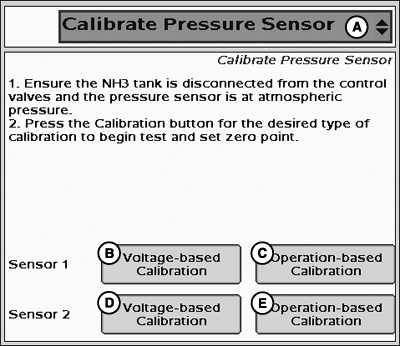
Calibrate Pressure Sensor
A - Tests Drop-Down Menu
B - Sensor 1 Voltage-based Calibration
C - Sensor 1 Operation-based Calibration
D - Sensor 2 Voltage-based Calibration
E - Sensor 2 Operation-based Calibration
The Calibrate Pressure Sensor option is only available in the Tests drop-down menu when at least one Pressure Sensor Enable/Disable box is checked on the Setup >> Systems Tab.There are two options for calibrating a pressure sensor. The Operation Based Calibration requires that two calibration points be entered and is used when the slope of the pressure sensor is not known. The Voltage Based Calibration can be used when the slope of the pressure sensor is known and only requires a zero point.
-
Ensure the NH3 tank is disconnected from the control valves
and the pressure sensor is at atmospheric pressure.
- Press the Calibration button for the desired type of calibration to begin test and set zero point.
PC12999-UN-04NOV10
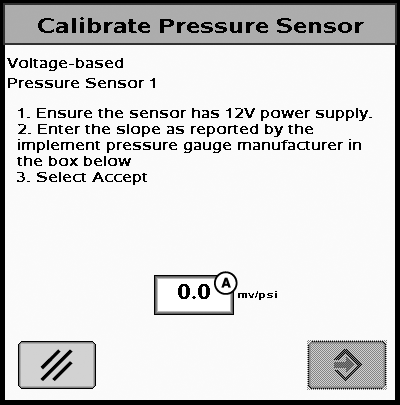
Calibrate Pressure Sensor
A - Sensor Slope Input Box
Voltage-based Calibration
-
Ensure the sensor has 12V power supply.
NOTE: Check with sensor manufacturer to ensure that sensor can
accept 12V power.
-
Enter the slope as reported by the implement pressure gauge
manufacturer in the box below.
- Select Accept.
NOTE: Sensor power can be connected to the ECU Power pin (pin 26 of 37-pin connector) to provide 12V.
NOTE: For Raven pressure sensors with a 12V power supply the slope will be 16 mV/psi.
PC13004-UN-04NOV10
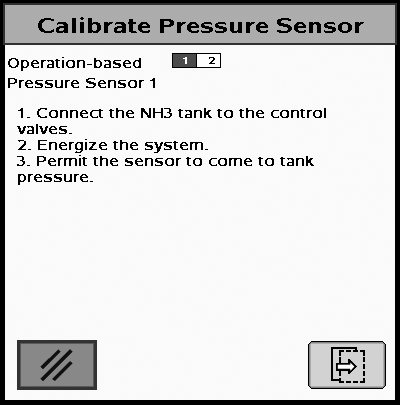
Calibrate Pressure Sensor
Operation-based Calibration
-
Connect the NH3 tank to the control valves.
-
Energize the system.
- Permit the sensor to come to tank pressure.
PC13005-UN-04NOV10
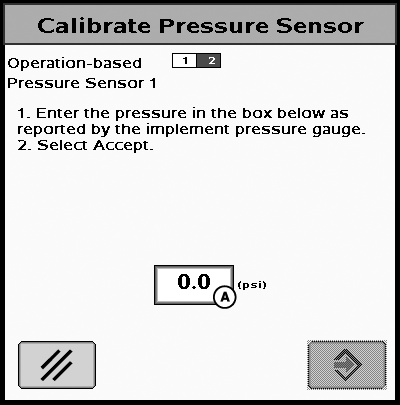
Calibrate Pressure Sensor
A - Pressure Input Box
-
Enter the pressure in the box below as reported by the implement
pressure gauge.
- Select Accept.
|
CZ76372,0000212-19-20101109 |