Configuration Test
PC13156-19-17FEB11
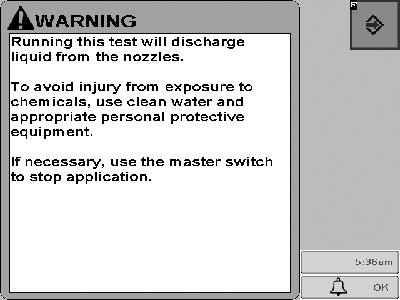
This message will be displayed when any diagnostic test is selected on sprayer or liquid fertilizer applications that will discharge liquid.
PC14154-UN-01NOV11
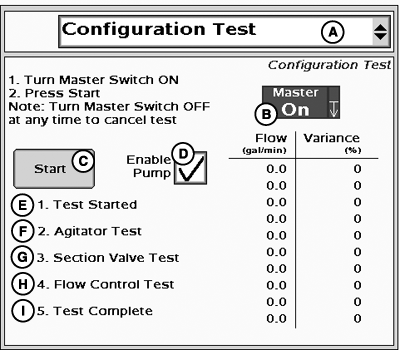
Configuration Test
A - Tests Drop-Down Menu
B - Master Switch Indicator
C - Start Configuration Test Button
D - Enable Pump Checkbox
E - Test Started
F - Agitator Test
G - Section Valve Test
H - Flow Control Test
I - Test Complete
The operator can run a configuration test to ensure that the system is functioning properly.IMPORTANT: Always fill the solution tank with clean water to do a proper configuration test.
NOTE: Turn Master Switch OFF at any time to cancel test.
- Select Configuration test from the tests drop-down menu (A).
- Turn the Master Switch ON.
-
Enable Pump checkbox (D) if it is displayed.
NOTE: Enable Pump Checkbox (D) will only be displayed if control
valve type is PWM and Pump Enable checkbox was selected in PWM settings.
- Select Start button (C) on the screen.
To begin configuration test:
-
The agitator valve (if equipped) is opened for 15 seconds.
-
Each boom section valve is individually cycled on/off for approximately
6 seconds, starting with the left-most boom, and moving from left
to right then back from right to left. All boom section valves are
then turned on for approximately 10 seconds.
- The flow control valve is tested across the entire range of flow. The results are displayed on in the Flow / Variance table on the screen. A low Variance % indicates a properly functioning flow control valve.
When the test is started, the following procedures are automatically performed in sequence:
-
Ensure to enter the correct calibration value for the control
valve type (or a similar valve type) that is being used. This value
is a starting point and can be tuned specific to your system.
-
The lower the Variance (%), the better the GreenStar Rate Controller
is able to control at a desired flow rate. There are a few issues
that might cause the variance on the configuration test to be inconsistent:
-
Low pump speed (low flow through SCV).
-
The amount of liquid in the sprayer tank. For example, if the
liquid in the sprayer tank is low and the back of the sprayer is on
a down hill slope, it may not be able to draw in enough liquid to
achieve the higher flow rates.
-
Low pump speed (low flow through SCV).
- System operating parameters (example: tractor speed, pump speed, etc.) may need to be adjusted to increase performance at certain levels.
If the system does not control rate accurately, there are a few things to look for and adjust. (A high variance number in the desired flow range indicates inaccurate rate control.)
|
HC94949,00004F3-19-20140501 |