Section Test
PC13156-19-17FEB11
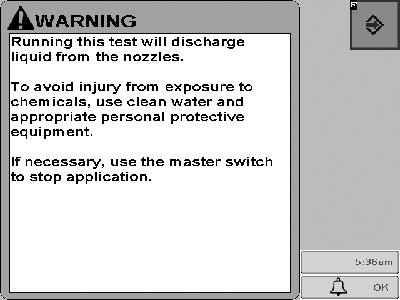
This message will be displayed when any diagnostic test is selected on sprayer or liquid fertilizer applications that will discharge liquid.
PC14157-UN-02NOV11
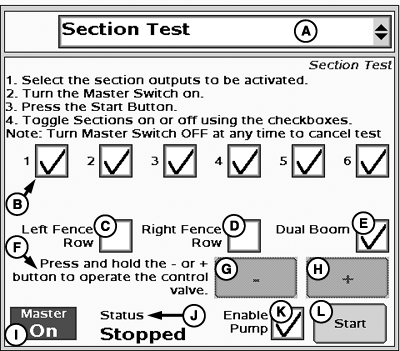
Section Test
A - Test Type Drop-Down Menu
B - Section Checkboxes
C - Left Fence Row Check Box
D - Right Fence Row Check Box
E - Dual Boom Check Box
F - Press and hold the - or + button to operate the control valve.
G - - Button
H - + Button
I - Master Switch Indicator
J - Test Status
K - Enable Pump Checkbox
L - Start Section Test Button
- Select Section Test from the tests drop-down menu.
- Select the section/fence row nozzle outputs to be activated.
- Turn the Master Switch ON.
-
Check Enable Pump checkbox (K) if it is displayed.
NOTE: Enable Pump checkbox (K) will only be displayed if control
valve type is PWM and Pump Enable checkbox was selected in PWM settings.
- Select Start button on the screen.
-
Toggle sections/fence row nozzles on or off using the checkboxes.
NOTE: Turn Master Switch OFF at any time to cancel test.
To begin Section test:
HARDI Section Bypass (Constant Flow) Valves
To set up HARDI Section Bypass (Constant Flow) Valves, follow these instructions:
-
Ensure all sections are turned on and fence row nozzles are turned off
-
Set a normal operating flow rate/pressure using the + and – buttons.
-
Note the pressure on the HARDI pressure gauge located near the section bypass (Constant Flow) valves.
-
Switch off the 1st section (left-most section).
-
Adjust the flow bypass on the first (left-most) valve to restore the gauge pressure to the pressure noted in Step 3.
-
Repeat the process by switching off the next section and restoring the pressure.
NOTE: Sections that are selected will open while the test is in progress. Non-selected sections will remain closed.
NOTE: Dual boom box will be hidden if dual boom is not configured.
NOTE: Fence row nozzle boxes will be hidden if not configured.
|
HC94949,00004F6-19-20140501 |