Implement Setup
-

PC9419-UN-12SEP06Setup Softkey
Select Setup.NOTE: Turn off Master Switch to change most settings or values.
-
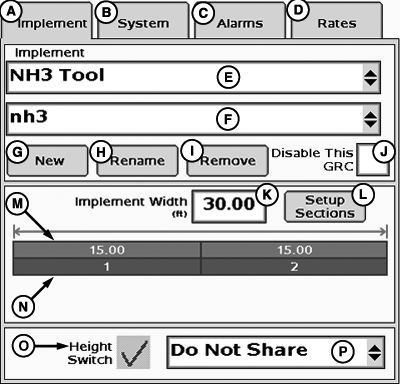
PC12981-UN-28OCT10A - Implement Tab
B - Systems Tab
C - Alarms Tab
D - Rates Tab
E - Implement Type Drop-Down Menu
F - Implement Name Drop-Down Menu
G - New Button
H - Rename Button
I - Remove Button
J - Disable Rate Controller Checkbox
K - Implement Width Input Box
L - Setup Sections Button
M - Implement Section Widths
N - Associated Switchbox Switch Numbers
O - Height Switch Checkbox
P - Height Switch Message Drop-Down Menu
Select Implement tab (A).NOTE: Switchbox switch numbers (N) are only available if a switchbox is connected.
|
HC94949,000067B-19-20141208 |