Set Up Planter Sections
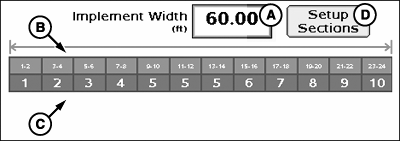
PC20775-UN-03FEB15
Setup Sections
A - Implement Width Input Box
B - Implement Section Widths
C - Associated Switchbox Switch Numbers
D - Setup Sections Button
Initial implement width (A) may be entered into the implement width input box. Width entered is evenly distributed among sections.If implement sections (B) are different widths or associated switches (C) are different, select Setup Sections (D) and follow on screen instructions.
-
PC20602-UN-17DEC14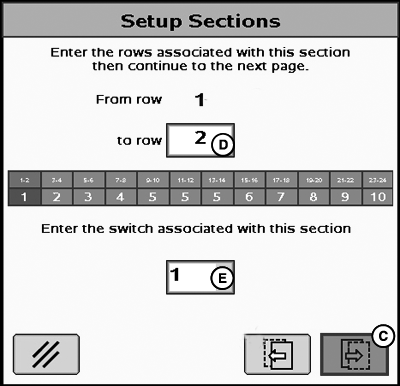
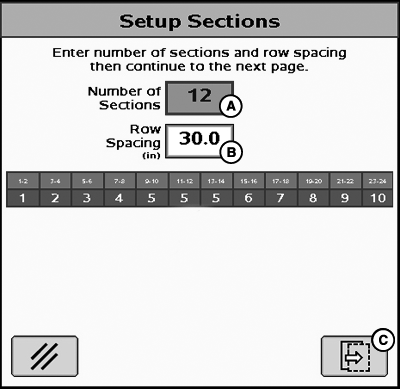
PC20603-UN-17DEC14A - Number of Sections Input Box
B - Row Spacing Input Box
C - Next Button
D - To Row Input Box
E - Switchbox Switch Association Drop-Down Menu
Enter number of sections (A). - Enter row spacing distance (B).
- Select Next (C).
- Enter rows associated with each section by inputting a row number into input box (D). For example, entering a value of 2 designates rows 1 and 2 as first planter section.
- Select associated switchbox switch number from drop-down (E).
- Define remaining sections by pressing Next and entering row numbers into input box.
|
HC94949,000068B-19-20150203 |