Implement Section States
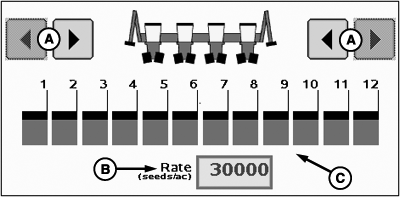
PC11358-UN-02OCT08
A - Section ON/OFF Buttons
B - Seed Rate Input Box
C - Section Indicator
- Disabled—Section is disabled.
- Enabled—Section is enabled.
- Active—Section is planting.
Implement sections can be in one of three states:
Section on/off buttons (A) arm or disarm one section at a time from left to right or right to left. The operator can also enable/disable sections with the switch box in the cab.
Sections that are in the enabled state have black fill color indication.
Active sections have a green rectangle indication under the section.
Sections that are in the off state are transparent.
|
HC94949,00006A7-19-20141217 |