Set Up SeedStar™ Generation 2 Planters
Some planters may be equipped with SeedStar™ Generation 2. The GreenStar™ Rate Controller automatically recognizes SeedStar ™ Gen 2 is present.
PC12992-UN-28OCT10
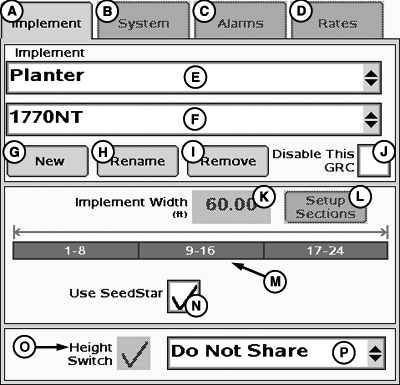
Default SeedStar Configuration
A - Implement Tab
B - System Tab
C - Alarms Tab
D - Rates Tab
E - Implement Type Drop-Down Menu
F - Implement Name Drop-Down Menu
G - New Implement Button
H - Rename Implement Button
I - Remove Implement Button
J - Disable Rate Controller Checkbox
K - Implement Width Input Box
L - Setup Sections Button
M - Implement Sections
N - SeedStar ON/Off Checkbox
O - Height Switch Checkbox
P - Height Switch Message Drop-Down Menu
The Implement Setup page for SeedStar ™ Gen 2 planters includes an extra check box on the bottom of the page labeled “USE SEEDSTAR” The box has a check in it by default. With this box checked, the controller uses setup information from SeedStar ™ Gen 2 Controller.NOTE: In order for the controller to recognize SeedStar™ Gen 2 and use its configuration information, it must be connected to CAN Bus and running when the GreenStar™ Rate Controller planter configuration is created.

PC10537-UN-13SEP07
Custom SeedStar Configuration
A - Use SeedStar™ Check Box
To customize the SeedStar™ 1 configuration, remove the check from the box and setup the sections manually.
PC10534-UN-13SEP07
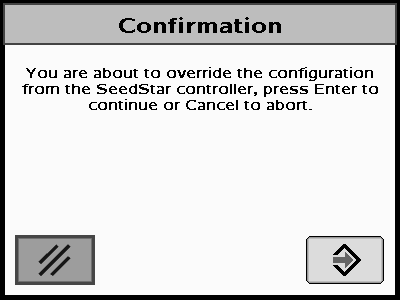
SeedStar™ Confirmation
When disabling SeedStar™, a confirmation screen appears.SeedStar™ Confirmation— You are about to override the configuration from the SeedStar™ controller, select Enter to continue or Cancel to abort.
Select enter to continue.
Refer to SETUP PLANTER SECTIONS.
|
SeedStar is a trademark of Deere & Company GreenStar is a trademark of Deere & Company |
HC94949,00006A8-19-20141217 |