Set Up Implement Sections
PC20504-UN-08DEC14
Setup Sections
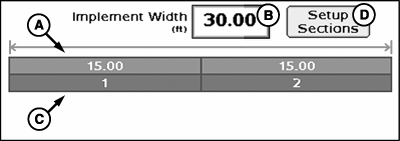
A - Implement Section Widths
B - Implement Width Input Box
C - Associated Switchbox Switch Numbers
D - Setup Sections Button
Initial implement width (A) may be entered into the Implement Width input box (B). The width entered is evenly distributed among sections.If implement sections are different widths or associated switches (C) are different, select Setup Sections button (D) and follow onscreen instructions. Fence row nozzles are also included under setup sections.
-
PC20611-UN-17DEC14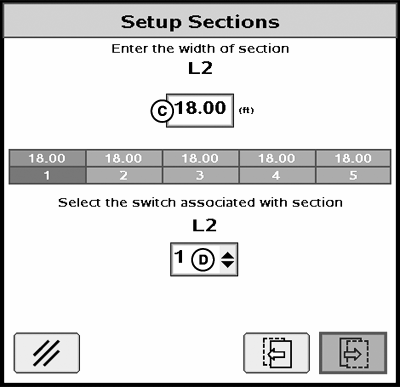
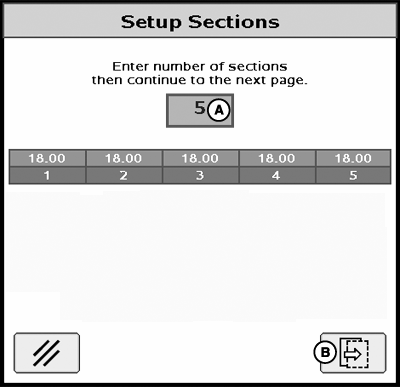
PC20612-UN-17DEC14A - Number of Sections Input Box
B - Next Button
C - Section Width Input Box
D - Switch Box Input Box
Enter number of sections (A).NOTE: Switchbox information is hidden when no switchbox is connected.
-
Select Next (B) to enter individual section width (C) and associated switch box number (D).
|
HC94949,00006B3-19-20141217 |