Alarms Setup (Optional)
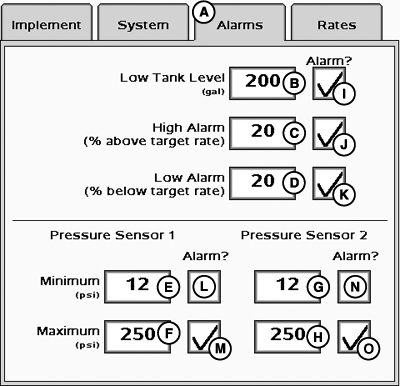
PC20619-UN-18DEC14
A - Alarms Tab
B - Low Tank Level Input Box
C - High Alarm Input Box
D - Low Alarm Input Box
E - Pressure Sensor 1 Minimum Pressure Input Box
F - Pressure Sensor 1 Maximum Pressure Input Box
G - Pressure Sensor 2 Minimum Pressure Input Box
H - Pressure Sensor 2 Maximum Pressure Input Box
I - Low Tank Level Checkbox
J - High Alarm Checkbox
K - Low Alarm Checkbox
L - Pressure Sensor 1 Minimum Pressure Checkbox
M - Pressure Sensor 1 Maximum Pressure Checkbox
N - Pressure Sensor 2 Minimum Pressure Checkbox
O - Pressure Sensor 2 Maximum Pressure Checkbox
Alarms allow the operator to predefine alerts for application rate and low tank level. Alarms are percentage-based, and alert the operator when the value goes outside of range. For example, if the application rate is set to 100 and the high and low alarm is set at 20, the alert triggers when the application rate is below 80 or above 120.
-
Select Alarms tab (A).
-
Enter Low Tank Level volume (B).
-
Enter High Alarm (C) and Low Alarm (D) percent rates .
-
Enter Minimum (E) and Maximum (F) pressure for Pressure Sensor 1, if equipped.
-
Enter Minimum (G) and Maximum (H) pressure for Pressure Sensor 2, if equipped.
-
Enable desired alarm checkboxes (I–O).
|
HC94949,00006BF-19-20150106 |