Rates Setup
PC12548-UN-08APR10
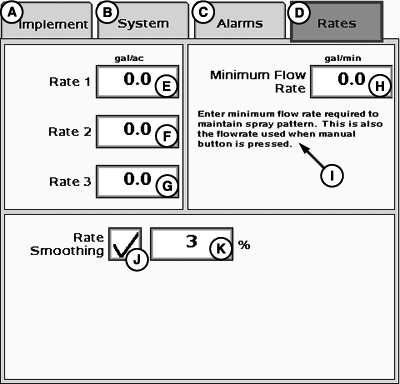
A - Implement Tab
B - System Tab
C - Alarms Tab
D - Rates Tab
E - User Rate 1 Input Box
F - User Rate 2 Input Box
G - User Rate 3 Input Box
H - Minimum Flow Rate Input Box
I - Enter minimum flow rate required to maintain spray pattern. This is also the flow rate used when manual button is pressed.
J - Rate Smoothing Enable/Disable Box
K - Rate Smoothing Input Box
-
Select Rates tab.
-
Input Target Rates (E–G).
NOTE: Values entered on this page are available on the home page.
-
Input Minimum Flow Rate (H), if desired. Default value is 0.0.
NOTE: Minimum Flow Rate is useful for maintaining constant pressure when making headland turns where speed is lower than normal. This changes drastically over a short period of time. Minimum Flow Rate applies to entire boom width. If one or more boom sections are turned off, the actual minimum flow rate will be adjusted to account for reduced working width.
-
Enable Rate Smoothing (J–K), and enter user-defined Rate Smoothing percent.
NOTE: Rate Smoothing percentage range is 3–15% and system defaults to 3%.
|
HC94949,0000708-19-20150123 |