Implement Section States
PC11338-UN-10SEP09
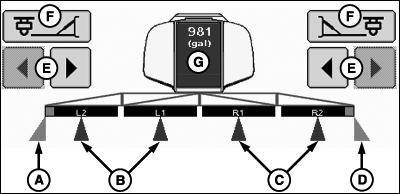
Implement Sections Spraying
A - Left Fence Row Nozzle Active
B - Left Sections Active
C - Right Sections Active
D - Right Fence Row Nozzle Active
E - Section ON/OFF Buttons
F - Fence Row Nozzles ON/OFF Buttons
G - Tank Level/Tank Refill
- Disabled—Section is disabled.
- Enabled—Section is enabled.
- Active—Section is spraying.
Implement sections can be in one of three states:
Section on/off buttons (E) enable or disable one section at a time from left to right or right to left.
The fence row nozzle buttons (F) enable or disable fence row nozzles.
NOTE: Operator can enable and disable fence row nozzles with switch box in cab.
|
Section (B, C) |
Fence Row (A, D) |
|
|---|---|---|
|
Disable |
Clear Square |
No Square |
|
Enable |
Black Square |
Purple Square |
|
Active |
Blue Square |
Purple Triangle and Square |
|
Not Active |
Clear Square |
Clear Square |

PC11273-UN-17SEP08
Implement Section States
Dual BoomOpen triangles indicate dual boom is configured, but not spraying. Light blue triangles indicate dual boom is spraying.
NOTE: When active, second tier clear triangle appears. Dual boom appears as clear triangle when below dual boom activation speed setting. After achieving speed, triangle turns turquoise.
|
HC94949,000070C-19-20150123 |