Reports and Totals

PC9669-UN-26OCT06
Reports and Totals Softkey
PC12977-UN-27OCT10
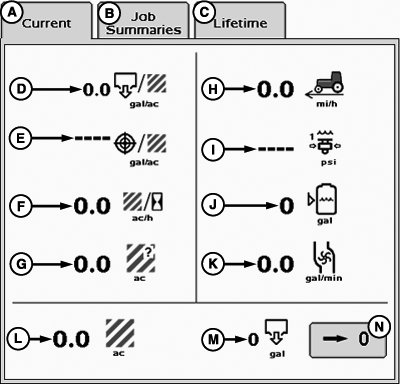
Current Tab
A - Current Tab
B - Job Summaries Tab
C - Lifetime Tab
D - Actual Rate Per Area
E - Target Rate Per Area
F - Area Per Hour
G - Area Remaining on Current Tank Level
H - Traveling Speed
I - Pressure Sensor 1
J - Volume Remaining
K - Volume Per Time (Flow rate)
L - Area
M - Volume Applied
N - Reset Counter Button
Select the Reports and Totals button to show the following page.The current page displays instant values.
PC12247-UN-10SEP09
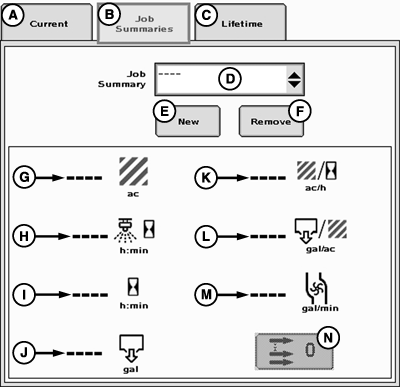
Job Summaries Tab
A - Current Tab
B - Job Summaries Tab
C - Lifetime Tab
D - Job Summary Drop-Down Menu
E - New Button
F - Remove Button
G - Area
H - Time Spent Spraying
I - Total Hours Spent on Job
J - Volume
K - Average Area Per Hour
L - Average Volume Per Area
M - Volume Per Time (Flow rate)
N - Zero Button
Job Summaries
The job summaries page will keep track of totals listed on the job page. Only values for the currently selected job summary will be incremented.
Job summaries are stored on the controller. The controller can store up to 6 different jobs for each configuration.
- Select the “New” button and a keypad will appear.
- Type in a name for the current job on the key pad.
- Select enter.
To create a new job follow these steps:
Jobs that are no longer needed may be deleted by selecting the job and pressing the remove button.
Totals can be reset to zero by pressing the zero button.
PC12248-UN-10SEP09
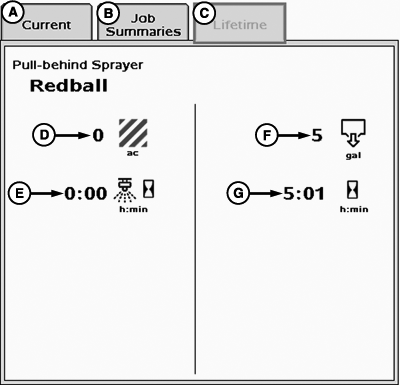
Lifetime Tab
A - Current Tab
B - Job Summaries Tab
C - Lifetime Tab
D - Total Area
E - Time Spent Applying
F - Total Volume
G - Total Hours
LifetimeThe lifetime page keeps track of all totals for the lifetime of the implement selected.
|
HC94949,0000710-19-20150203 |