System Setup
 CAUTION: Selecting the wrong valve type may result in valves
opening unexpectedly. To avoid injury from exposure to chemicals,
verify the correct valve is selected. Review control valve type before
moving GreenStar™ Rate Controller between implements.
CAUTION: Selecting the wrong valve type may result in valves
opening unexpectedly. To avoid injury from exposure to chemicals,
verify the correct valve is selected. Review control valve type before
moving GreenStar™ Rate Controller between implements.
-
Select System tab.
-

PC12277-UN-16SEP09Control Valve Type
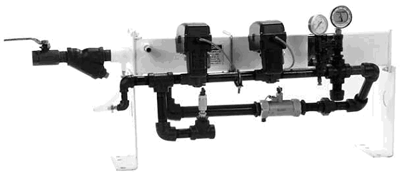
PC10645-UN-11OCT07Dual Valve System
A - Control Valve Type Drop-Down Menu
Select Control Valve Type from drop-down (A).NOTE: If 2-wire valve is required and not shown in the drop-down, adjust number of implement sections in earlier Implement Setup (see component compatibility section).
-
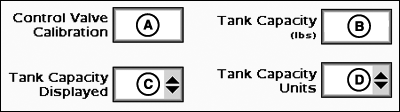
PC12985-UN-28OCT10Control Valve Calibration
A - Control Valve Calibration
B - Tank Capacity
C - Tank Capacity Displayed
D - Tank Capacity Units
Select and enter Control Valve Calibration number (A).NOTE: Table shows recommended values. Fine-tune control valve calibration valve for optimal performance (see fine-tuning procedure in Troubleshooting section).
-
Select and enter maximum Tank Capacity (B).
-
Select Tank Capacity Displayed from drop-down (C).
-
Select Tank Capacity Units from drop-down (D).
Standard Valve Type
Valve Calibration Number (XXYZ)
Raven™ 165
2513
Raven™ 894
2513
Raven™ 125
2513
TeeJet®
1003
HARDI®
7051
Fast-Close Valve Type
Valve Calibration Number (XXYZ)
Raven™ 177
0753
HINIKER™ Servo Valve (8160 Monitor Compatible)
0433
Fast-Close Valve Type
Valve Calibration Number (XXYZ)
Raven™ 177
0753
HINIKER™ Servo Valve (8160 Monitor Compatible)
0433
NOTE: These are recommended values. It is recommended to fine tune control valve calibration number for optimal performance (see fine tuning procedure in Troubleshooting section).
-
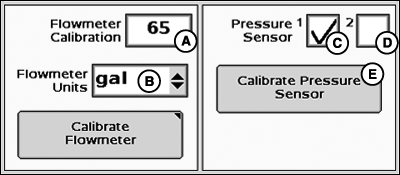
PC20626-UN-18DEC14A - Flowmeter Calibration Input Box
B - Flowmeter Units Drop-down Menu
C - Pressure Sensor 1 Checkbox
D - Pressure Sensor 2 Checkbox
E - Calibrate Pressure Sensor Button
Select and enter Flowmeter Calibration (A) as stamped on valve.NOTE: Most flowmeters have an attached tag indicating the recommended calibration number. Enter this number as the initial flowmeter calibration value. It is not necessary to enter an additional product mass conversion value as the controller does it automatically.
-
Select Flowmeter Units from drop-down (B).
-
Select Pressure Sensor 1 (C) if sensor is installed. If using more than one pressure sensor, select Pressure Sensor 2 (D). If a pressure sensor is selected, pressure indicator displays on Menu instead of flow rate.
-
Select Calibrate Pressure Sensor button (E) and follow the onscreen instructions. Once calibration is completed, select Setup softkey to return to System Setup.
(Refer to Sprayers and Liquid Fertilizer Tool Diagnostics.)
|
GreenStar is a trademark of Deere & Company Raven is a trademark of Raven Industries Incorporated TeeJet is a trademark of Spraying Systems Company HARDI is a trademark of HARDI Midwest Incorporated HINIKER is a trademark of Hiniker Company |
HC94949,0000711-19-20150129 |