Run Page–NH3
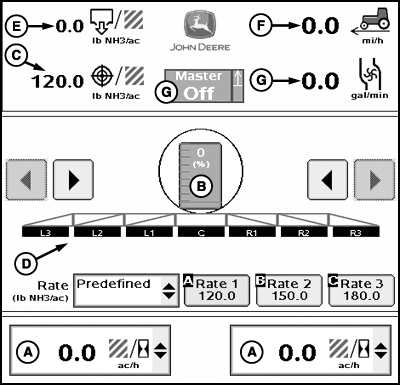
PC20751-UN-29JAN15
Main Page–NH3
A - Information Drop-Down Menu
B - Flow (Volume Per Time)
C - Tank Levels Button
D - Target Rate
E - Section Indicators
F - Actual Rate
G - Master Switch Indicator/Implement Height Switch Indicator
- Productivity (area per hour)
- Estimated time remaining on current tank level
- Estimated area remaining on current tank level
- Flow per minute
- Area covered
- Total product applied
- Average application rate
- Speed
- Pressure sensor 2
The Information drop-down includes:
The estimated time and area values are an instantaneous calculation based on current tank level. Estimated time and area values can be expected to fluctuate due to changes in flow rate, working width, or speed while operating.
NOTE: Flow per minute is only an option when pressure sensor is installed.
Area covered, total product applied, and average application rate can be zeroed by selecting Reports and Totals softkey > Current tab.
Pressure sensor 2 is only an option when two pressure sensors have been configured.
To verify the height switch operates correctly, raise and lower the implement while observing the height switch indicator.
Height switch indicator displays whether implement is in up or down position.
|
HC94949,0000732-19-20150204 |