Run Page–Sprayer
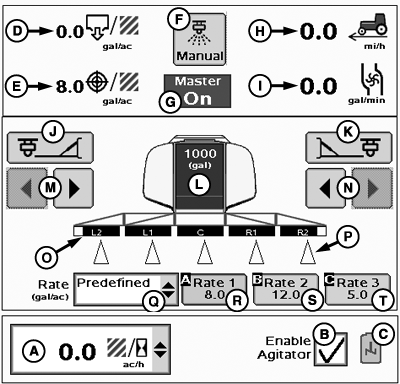
PC20780-UN-03FEB15
GreenStar™ Rate Controller Main Page
A - Information Drop-Down Menu
B - Enable Agitator Checkbox
C - Agitator Icon
D - Actual Rate
E - Target Rate
F - Manual Spray Button
G - Master Switch Indicator/Implement Height Switch Indicator
H - Travel Speed
I - Flow (Volume per Time)
J - Left Fence Row Nozzle On/Off Button
K - Right Fence Row Nozzle On/Off Button
L - Tank Level Indicator Button
M - Left Side Section On/Off Buttons
N - Right Side Section On/Off Buttons
O - Implement Sections
P - Section Status Indicators
Q - Rate Selection Drop-Down Menu
R - Predefined Rate 1
S - Predefined Rate 2
T - Predefined Rate 3
Information drop-down (A) includes:
- Productivity (area per hour)
- Estimated time remaining on current tank level
- Estimated are remaining on current tank level
- Flow per minute
- Area covered
- Total product applied
- Average application rate
- Speed
- Pressure sensor 2
Estimated time and area values are an instantaneous calculation based on current tank level. Estimated time and area values can be expected to fluctuate due to changes to flow rate, working width, or speed while operating.
To activate agitator, select Enable Agitator checkbox (B).
Agitator icon (C) changes from gray to white when active.

PC20781-UN-03FEB15
A - Enable Pump Checkbox
Enable Flow Return in System Setup to display Enable Pump checkbox (A).|
HC94949,000073F-19-20150203 |