Section Test
PC12307-UN-06OCT09
Section Test
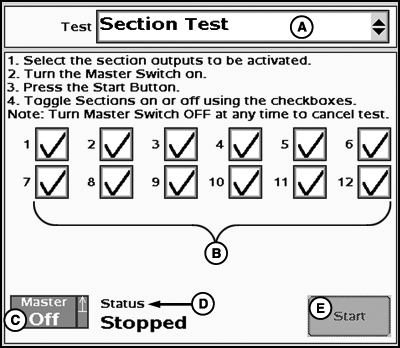
A - Tests Drop-Down Menu
B - Section 1 through 12 ON/OFF Checkboxes
C - Master Switch Indicator/Implement Height Switch Indicator
D - Test Status
E - Start Section Test Button
- Select Section test from the tests drop-down menu.
- Select the section outputs to be activated.
- Turn the Master Switch ON.
- Select Start button on the screen.
- Toggle sections on or off using the checkboxes.
- Turn Master switch off any time to cancel test.
To begin Section test:
NOTE: Sections that are selected will not plant. Non-selected sections will plant while the test is in progress.
|
JS56696,0000750-19-20091014 |