Active Implement Guidance System
Implement Steer Main
-

PC8663-UN-29APR15Menu Button

PC14926-UN-27APR12Application Controller 1100 Button

PC13072-UN-16NOV10Application Controller Main Softkey

PC18007-UN-07NOV13Implement Steer Main Button
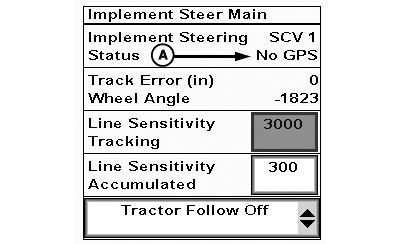
PC13527-UN-03MAY11Status Code Location
A - Status Code
Select Menu button. -
Select Application Controller 1100 button.
-
Select Application Controller Main softkey.
-
Select Implement Steer button.
|
Status Code |
Description |
Solution |
|---|---|---|
|
Not Activated |
Desired application has not been activated on controller. |
Obtain an activation code for application. |
|
No GPS |
No global position system (GPS) correction available. |
Ensure GPS on implement and machine are connected and functioning properly. |
|
Cycle Power |
Controller must be restarted to communicate with new function. |
Shut off machine and start again. |
|
No RTK |
No real time kinematic (RTK) correction seen on selected receiver, or RTK not currently available. |
Activate RTK on implement receiver and (or) machine receiver. |
|
Update GPS SW |
Incompatible software loaded. |
Update software on GPS receiver(s) to compatible version. |
|
Tractor SCV Not Auto |
Selective control valve (SCV) control not detented to engage Active Implement Guidance. |
Detent SCV to engage Active Implement Guidance. For external valve, detent added SCV lever. |
|
OK |
System is ready to operate. Any faults are likely to be independent of Active Implement Guidance control system and machine or implement. |
System working properly. |
|
Implement Up |
Implement is raised or has faulty implement height switch. |
Ensure requirement to engage is correct. |
| Symptom | Problem | Solution |
|
Monitor screen not readable on hookup to machine. | No communication with implement controller. |
Shut off power, check connections, and power up to reboot system.
Check 4-pin DEUTSCH® connector at back of ISO implement connector on machine for cleanliness and proper attachment.
Verify connector at head of implement is seated tight. |
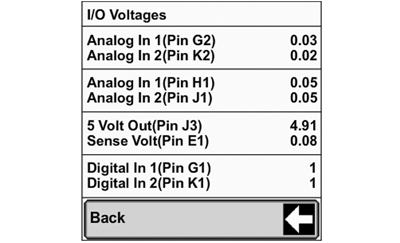
Input / Output (I/O) Voltages
PC8663-UN-29APR15
Menu Button
PC14926-UN-27APR12
Application Controller 1100 Button

PC12961-UN-13APR15
Setup Softkey

PC21345-UN-09JUL15
I/O Voltages Button
PC19689-UN-12JUN14
I/O Voltages
-
Select Menu button.
-
Select Application Controller 1100 Button.
-
Select Application Controller Setup softkey.
-
Select I/O Voltages Button.
|
I/O Voltages Page |
System Definitions |
||
|
Description |
Reading |
Integrated |
External Valve |
|
Analog In Pin 1 (Pin G2) |
Wheel angle sensor voltage reading SCV 1 = 0—5 V, 2.5 V = neutral |
Current voltage reading of Wheel Angle Sensor when plugged into SCV 1 on Implement feedback harness. |
|
|
Analog In Pin 2 (Pin K2) |
Wheel angle sensor voltage reading SCV 3 = 0—5 V, 2.5 V = neutral |
Current voltage reading of Wheel Angle Sensor when plugged into SCV 3 on Implement feedback harness. |
|
|
Analog Out Pin 1 (Pin H1) |
Command SCV 1 voltage value 0—5 V, 2.5 V = neutral |
When set up for SCV 1 this is the voltage commanded to hydraulics controller, or current command voltage of respective SCV if not in Auto mode. |
When set up for SCV 1, this is the voltage reading of external SCV lever. Approximately 2.8 V is neutral. If close to 0 V and (or) not changing with movement of paddle pod, ensure external valve is connected and light is on. |
|
Analog Out Pin 2 (Pin J1) |
Command SCV 3 voltage value 0—5 V, 2.5 V = neutral |
When set up for SCV 3, voltage commanded to hydraulics controller, or current command voltage of respective SCV if not in Auto mode. |
Not available with External Valve. |
|
5 Volt Out |
Supplied voltage 0—5 V for system |
Voltage supplied to system, should read close to 5 V. |
|
|
Sensor Volt |
Sensor voltage 0—5 V, with implement feedback harness plugged in is 5 V, paddle pot is 0 V and changes with command |
Voltage coming from hydraulics controller system, reads 5 V. |
At rest and in detent, voltage is close to 0 V. When manually commanding, value changes with lever movement. |
|
Digital In 1 (Pin G1) |
External valve paddle pot, 0 = no command, 1 = command |
Not available. |
Value is used for External Valve SCV 1 and reads 0 at rest and changes to a 1 when moved. |
|
Digital In 2 (Pin K1) |
Value displays 1 |
Not available with External Valve. |
|
|
Line Count |
Not available for Active Implement Guidance. |
||
|
DEUTSCH is a trademark of Deutsch Co. |
AE77568,000011B-19-20150904 |