Select Optional Guidance Features
Follow Mode (Implement Steering Only)

PC14926-UN-27APR12
Application Controller 1100 Button

PC13072-UN-16NOV10
Application Controller Main Softkey

PC18007-UN-07NOV13
Implement Steer Main Button
PC19792-UN-14AUG14
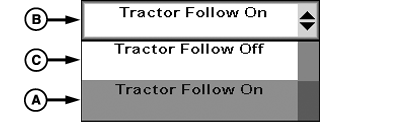
A - Tractor Follow On
B - Tractor Follow Drop-down
C - Tractor Follow Off
 CAUTION: Do not use Follow Mode on roadways.
To prevent serious injury, read and follow instruction to disable Active Implement Guidance in this manual before entering roadways.
NOTE: Follow Mode turns off at speeds greater than 35 km/h (21.7 mph).
Follow Mode turns off if speed is less than 0.5 km/h (0.3 mph) for more than 30 seconds.
Follow mode sets implement guidance path in same path as machine receiver, including turns on end rows. Using Follow mode allows Active Implement Guidance to operate while operator is driving machine without a guidance line defined. Follow mode is useful during first pass through field when guidance line is being defined.
-
Select Application Controller 1100 button.
-
Select Application Controller Main softkey.
-
Select Implement Steer Main button.
-
Select Tractor Follow On (A) from drop-down (B).
-
Set AB line. Operator is able to Engage and Disengage AutoTrac™.
To disengage Follow Mode, select Tractor Follow Off (C) from drop-down.
Shifter Stay On Mode (Implement Shifting Only)
PC14926-UN-27APR12
Application Controller 1100 Button
PC13072-UN-16NOV10
Application Controller Main Softkey

PC19780-UN-07JUL14
Implement Shift Main Button
PC19905-UN-11AUG14
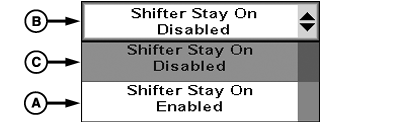
A - Shifter Stay On Enabled
B - Shifter Stay On Drop-down
C - Shifter Stay On Disabled
Shifter Stay On mode allows implement to follow guidance line independent of machine AutoTrac™ state. Shifter Stay On Enabled is used in applications where operator manually drives machine while implement follows guidance line. Use Shifter Stay On Disabled when AutoTrac™ is used to guide machine.-
Select Application Controller 1100 button.
-
Select Application Controller Main softkey.
-
Select Implement Shift Main button.
-
Select Shifter Stay On Enabled (A) form drop-down (B).
-
Drive towards guidance line.
-
Select AutoTrac™ resume.
-
Disengage machine's AutoTrac™ by moving steering wheel. Implement will continue to track guidance line.
-
When completing a turn, select Shifter Stay On Disabled (C) or implement will continue to steer towards guidance line unless automatic disengagement distance from guidance line is met.
|
AutoTrac is a trademark of Deere & Company |
RW00482,0000349-19-20141024 |