Adjust Selective Control Valve (SCV)
7R (S.N. 81000–), 8R (S. N. 91000–), 8RT (S. N. 913000–), 9R (S. N. 10000–), and 9RT (S.N. 904000–) Tractors
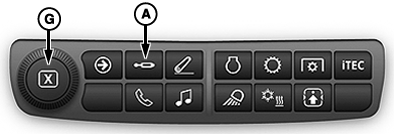
PC19926-UN-04SEP15
Navigation Bar
PC19927-UN-18AUG14
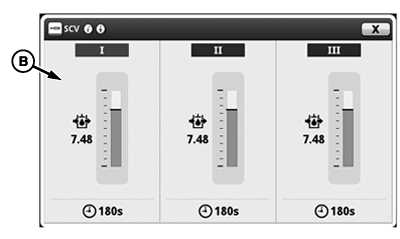
SCV Main Page
PC19928-UN-18AUG14
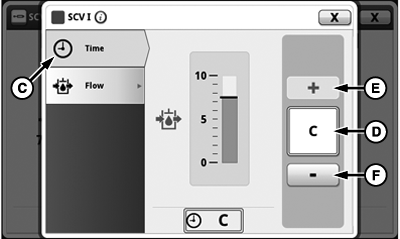
SCV Detent Time
PC19929-UN-18AUG14
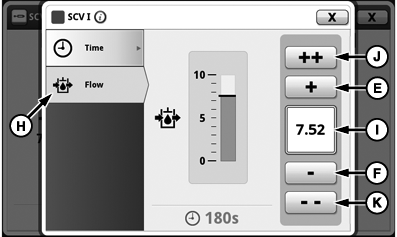
SCV Detent Flow
A - SCV Shortcut
B - SCV Main Page
C - Detent Time Tab
D - Detent Time
E - Small Increase (+)
F - Small Decrease (-)
G - Adjusting Dial
H - Detent Flow Tab
I - Detent Flow
J - Large Increase (+ +)
K - Large Decrease (- -)
SCVs in standard mode have one detent time and one detent flow setting which apply to both extend and retract.
-
Select SCV shortcut (A).
-
Select an SCV (B) to access standard mode.
-
Select Time tab (C).
NOTE: Detent time (D) displays amount of time in sec. Selecting small increase (+) (E) increases time in 1 sec. increments up to 10, then in increments of 2 sec. up to 20, then increases every 5 sec. to 30, then by 30 sec. up to C for continuous. Selecting small decrease (-) (F) decreases time setting by the same increments.
-
To increase detent time, select small increase (+). To decrease detent, select small decrease (-). Turning adjustment dial (G) also increases or decreases detent time settings.
-
Select Flow tab (H).
NOTE: Flow (I) is displayed in increments of 0.04 beginning at 0.04 through 10. Selecting small increase (+) increases flow by 0.04, selecting large increase (++) (J) increases flow by 1.00, and selecting small decrease (-) and large decrease (- -) (K) decreases flow setting by the same increments.
-
To increase flow, select small increase (+) or large increase (++). To decrease flow, select small decrease (-) or large decrease (- -). Turning adjusting dial also increases or decreases flow settings.
7R (S.N. –80999), 8R (S. N. –90999), 8RT (S. N. –912999), 9R (S. N. –09999), and 9RT (S.N. –903999) Tractors
RXA0117606-UN-10JUN11
CommandARM™ Menu Button > SCV Softkey
RXA0121756-UN-27OCT11
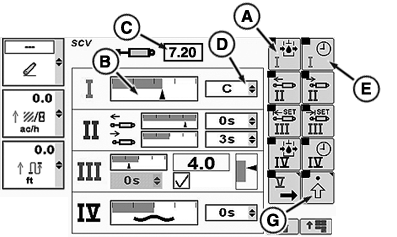
SCV Homepage
RXA0121757-UN-27OCT11
PC19925-UN-18AUG14
A - Detent Flow Softkey
B - Flow Bar Graph
C - Detent Flow Box
D - Detent Time Drop-down
E - Detent Time Softkey
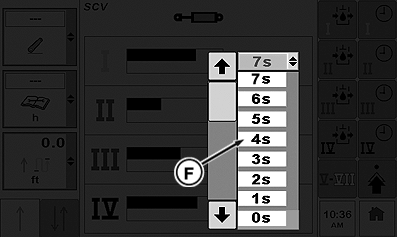
F - Detent Time Selections
G - Advanced Settings Softkey
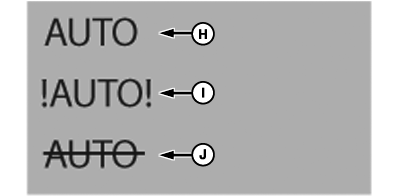
H - Auto Mode Indicator (Normal Operation)
I - Auto Mode Indicator (Fault Identified)
J - Auto Mode Indicator (Turned Off)
SCV 1 in standard mode has flow and detent time setting which adjusts both extend and retract.
-
Select Menu button.
-
Select SCV softkey.
-
Select Detent Flow softkey (A) to highlight flow bar graph (B).
NOTE: Current flow bar graph indicator depicts amount of flow. Flow is displayed in increments of 0.04 beginning at 0.04 through 10 in box (C).
-
Rotate CommandARM™ controls thumb wheel forward or rearward to adjust current flow bar graph indictor right or left respectively. Value in detent flow box increases or decreases as thumb wheel is rotated.
NOTE: When selected, detent time drop-down (D) displays amount of time in 1 sec. increments up to 10, then increments of every 2 sec.; 12, 14, 16, 18, up to 20, then 25, 30, 40, 50, 60, 90, 120, 180 sec. or C for continuous.
-
Select detent time softkey (E) to navigate to detent time drop-down. Open drop-down displaying available detent time selections (F).
-
Press Confirm button on CommandARM™ to select desired time. Desired time displays in drop-down.
NOTE: To set any SCV in independent mode, select advanced settings softkey (G).
AUTO (H) indicates normal Auto mode operation. !AUTO! (I) indicates that a fault and Auto mode is inoperable. AUTO with a strike through it (J) indicates that Auto mode is not active.
30 Series Tractors and Older
PC17987-UN-07NOV13
PC17988-UN-07NOV13
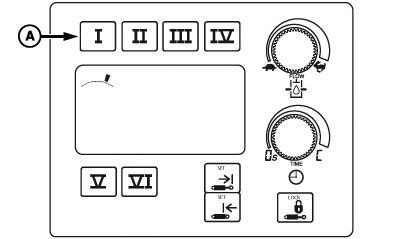
A - SCV Selection Buttons
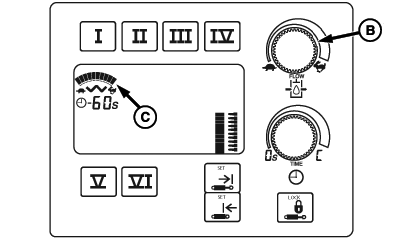
B - Flow Adjustment Dial
C - Bar Graph
 CAUTION: Excessive SCV flow rate settings can cause sudden machine
movement when cylinder is operated. Verify bystanders are clear of
machine to avoid injury before engaging SCV button to check current
flow rate. Full extension or retraction of cylinder should take approximately
2 seconds.
CAUTION: Excessive SCV flow rate settings can cause sudden machine
movement when cylinder is operated. Verify bystanders are clear of
machine to avoid injury before engaging SCV button to check current
flow rate. Full extension or retraction of cylinder should take approximately
2 seconds.
Adjust rate of operation for each job.
-
Select selective control valve (SCV) selection button (A) for SCV being used. Display under SCV selection buttons displays previous rate of flow.
NOTE: To provide operator with more indication of command setting, as operator turns flow adjustment dial (B) through flow settings, display increases or decreases number of line increments as flow changes.
-
Turn flow adjustment dial clockwise to increase flow or counterclockwise to decrease flow. Flow setting is displayed on bar graph (C) when adjustments are made.
NOTE: SCV can be operated to observe flow rate while in adjustment mode. If total flow demand exceeds available pump flow, reduced cylinder cycle times or a reduction in motor speed results.
|
SCV Flow Output (Approximate) |
||
|---|---|---|
|
SCV Flow Settings |
Flow |
|
|
L/min. |
gpm |
|
|
0.1 1 |
— |
— |
|
1.0 |
3.6 |
1.0 |
|
2.0 |
7.2 |
1.9 |
|
3.0 |
10.2 |
2.7 |
|
4.0 |
14.4 |
3.8 |
|
5.0 |
19.2 |
5.0 |
|
6.0 |
24.0 |
6.4 |
|
7.0 |
31.2 |
8.2 |
|
8.0 |
39.6 |
10.5 |
|
9.0 |
65.4 |
17.2 |
|
10.0 |
114 |
30.0 |
|
CommandARM is a trademark of Deere & Company 1 0.1 = Minimum Flow Setting |
RW00482,000034C-19-20140923 |