Boundaries Tab

PC8663-UN-29APR15
Menu

PC17340-UN-24OCT13
GreenStar 3 Pro

PC8672CC-19-24OCT13
Mapping Softkey

PC12933CC-19-24OCT13
Boundaries
Select Menu > GreenStar 3 Pro > Mapping > Boundaries
Boundaries tab allows operators to record exterior field boundaries and interior and headland boundaries. Boundaries calculate acreage. For best accuracy, drive exterior boundaries.
NOTE: Select New from drop-down menus to create client, farm, and field on Boundaries tab.
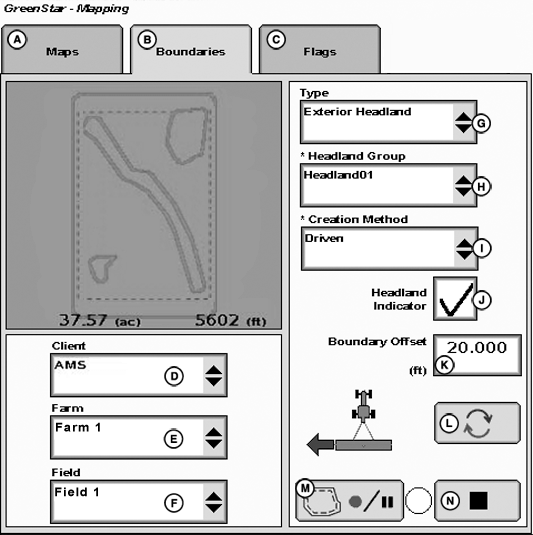
PC12926CC-19-24OCT13
Boundaries with Driven Exterior Headland Boundary
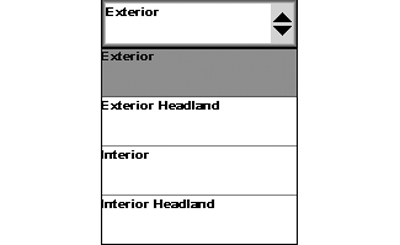
PC12925CC-19-24OCT13
Boundary Types
A - Maps
B - Boundaries
C - Flags
D - Client Dropdown
E - Farm Dropdown
F - Field Dropdown
G - Type Dropdown
H - Headland Group Dropdown
I - Creation Method Dropdown
J - Headland Indicator Checkbox
K - Boundary Offset Input-Box
L - Receiver Offset Toggle
M - Record and Pause Boundary Recording
N - Stop Recording
Available Boundary Types
Exterior—Perimeter of field.
Passable Interior—Perimeter of area inside field not farmed, but can be crossed with machine and implement (for example, a waterway).
Impassable Interior—Perimeter of an area inside field not farmed, but cannot be crossed with machine and implement.
Change boundary type to headland after creating an exterior or interior boundary. If an exterior or interior boundary is created, boundary type list changes to allow for headland boundaries.
Exterior Headland—End rows along sides of field where end turns occur.
NOTE: If Headland Indicator (J) is checked, display counts down distance to next headland on guidance map.
Interior Headland—End rows or turn rows around an impassable interior boundary.
Headland Group—Combination of one or more related headland boundaries. Different operations use different headland groups. For example, a planter group with 36.6 m (120 ft) headlands, and a field cultivator group with 27.4 m (90 ft) headlands.
Headland boundaries can be driven or offset from exterior or interior boundary.
NOTE: Ensure headlands are large enough for machine and implement to turn around without using brakes.
Headlands boundaries are for use with iTEC™ Pro. Other GreenStar™ software view headlands on Guidance page, but do not use them.
John Deere Section Control functionality is based on exterior boundaries and headlands, and interior and impassable interior boundaries.
Headlands on Guidance View page are dashed pink lines to show where headlands exist on maps and perspective views. Only exterior boundaries and impassable interior boundaries have a headland boundary.
|
iTEC is a trademark of Deere & Company GreenStar is a trademark of Deere & Company |
AE77568,00000E8-19-20150728 |