GreenSeeker
IMPORTANT: FieldDoc Connect Cable must be wired for COM Port 2 at the GreenStar 3 display. If no implement controller is connected to the GS3 Display, GreenSeeker cannot be selected as a prescription.
-
Attach GreenSeeker hardware according to the GreenSeeker manual.
-
Connect the GreenSeeker PDA to the GreenStar RS-232 cab connector.
-
Calibrate the John Deere spray system according to the spray system's manual.
-
Calibrate GreenSeeker System according to the GreenSeeker manual. (Calibration may not be needed).
-
Set Master Spray Switch (in cab) to AUX to enable SprayStar to accept the prescription.
-

PC8663-UN-29APR15MENU button

PC17340-UN-24OCT13GREENSTAR 3 PRO button

PC8676CC-19-24OCT13RESOURCE/CONDITION softkey
Select MENU button >> GREENSTAR 3 PRO button >> RESOURCE/CONDITIONS softkey >> RESOURCES tab -
Fill in Client, Farm, Field, and Task information to enable documentation.
-
PC8663-UN-29APR15MENU button
PC17340-UN-24OCT13GREENSTAR 3 PRO button

PC8677CC-19-24OCT13EQUIPMENT softkey
Select MENU button >> GREENSTAR 3 PRO button >> EQUIPMENT softkey >> MACHINE tabFill in machine information.
-
Press COM Port button.
-
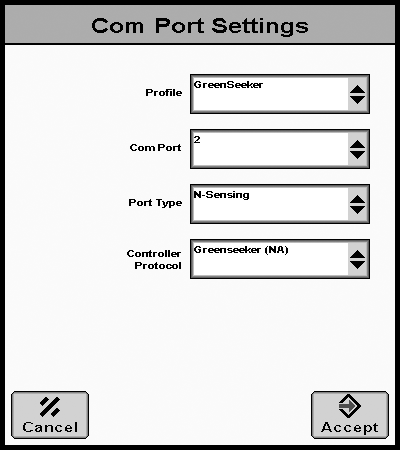
PC12920CC-19-24OCT13COM Port Settings
Select NEW in Profile drop-down box then enter desired Profile name. -
Assign Com Port to number 2.
-
Select N-Sensing in Port Type drop-down box.
-
Select Greenseeker (NA) in Controller Protocol drop-down box.
-
Then press ACCEPT button to continue.
-
PC8663-UN-29APR15MENU button
PC17340-UN-24OCT13GREENSTAR 3 PRO button

PC8678CC-19-24OCT13DOCUMENTATION softkey
Select MENU button >> GREENSTAR 3 PRO button >> DOCUMENTATION softkey >> PRODUCT APPLICATION tab -
Select auto-generated product application tab.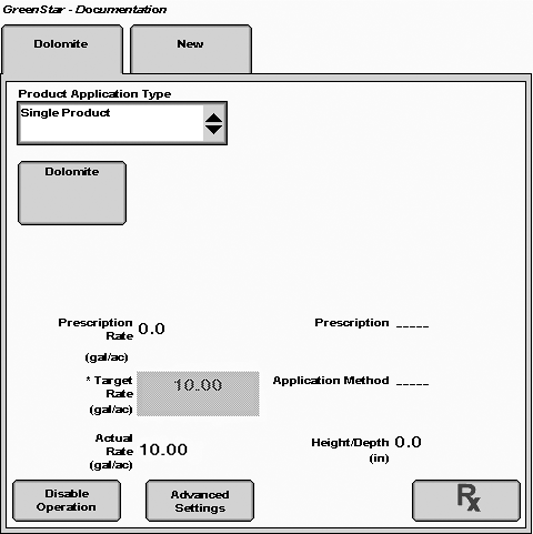
PC12848CC-19-24OCT13 -
Select Rx button to indicate prescription.
-
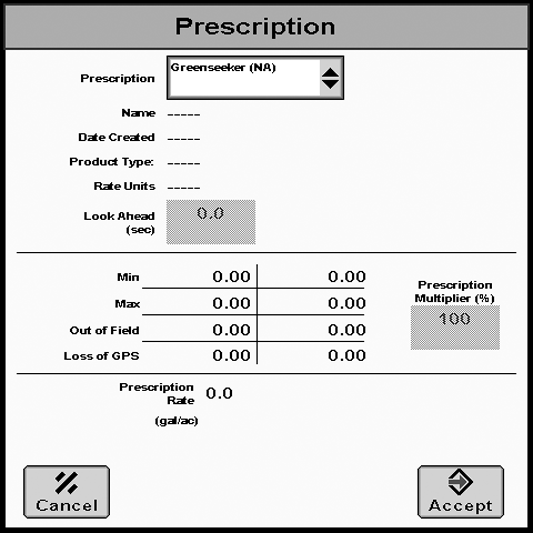
PC12919CC-19-24OCT13Prescription
Select GreenSeeker from Prescription drop-down list. -
Select the ENTER button to accept the prescription.
-
Setup is complete.
The GS3 is now ready to receive target rates from GreenSeeker.
|
CZ76372,0000143-19-20131024 |