Harvest Monitor Cotton Calibration
Calibration
NOTE: Always read the text to the left of the START/STOP arrow. This explains the current status of calibration. Arrow changes back and forth between START and STOP. When yield calibration is stopped, START arrow is shown. When yield calibration is running, STOP arrow is shown.
STOP arrow—CALIBRATION IS RUNNING. Push button to STOP CALIBRATION.
START arrow—CALIBRATION IS STOPPED. Push button to START CALIBRATION.
Screen: SETUP—YIELD CAL
Press: SETUP >> HARVEST MONITOR >> YIELD CALIBRATION
Mass flow sensors must be calibrated in order to achieve accurate cotton weights. Calibration should be performed when necessary as condition and maturity of crop change or at least once a season.
Quick Calibration: Easiest calibration procedure when there is no scale available for weighing harvest samples.
Standard Calibration: Used when actual weights can be obtained from a scale for harvest samples.
Manual Calibration: Only used if previous procedures do not work because calibration is off by more than 50%. Before performing manual calibration, check to make sure all components in yield monitoring system are installed and performing correctly, and that sensors are unobstructed.
Post Calibration: Done with desktop software. There is no post calibration procedure to be performed in field or on display. This is recommended method for best results. Desktop software allows post calibration using weight of crop from whole field or weight of crop from each module, depending on level of detail wanted.
Are you a customer that is using Harvest Monitor Cotton for the sole purpose of seeing your yield as you go across the field?
If you believe it is important for the Harvest Monitor Cotton system to be as accurate as possible at all times in the field (on display in cab), the following recommendation can help you achieve this expectation: Mass flow sensors need to be calibrated to achieve more accurate seed cotton weights shown on the display in the field. This is done by performing a QUICK CAL or STANDARD CAL after a Row Compensation Calibration is performed in uniform crop. STANDARD Cal, which uses actual scale weights, is the best form of calibration to use in order to attain more accurate cotton weights. Once calibrated, additional calibration may be used for any substantial changes in types of cotton, variety change, moisture, crop management, quality of defoliation, weeds, irrigated vs. non-irrigated, crop conditions, etc. Any of these condition changes in cotton could cause shift in accuracy of the system. Throughout the season it is recommended to check accuracy by weighing the cotton. Recalibration is suggested if you find that the system is not accurate.
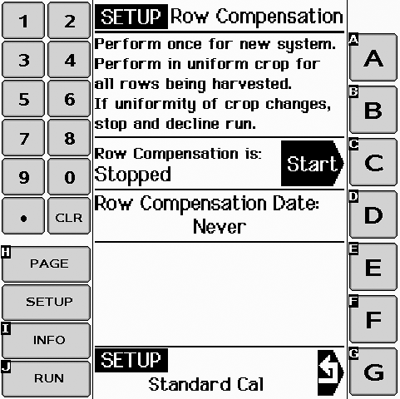
Row Compensation
PC12910CC-19-24OCT13
Row Compensation
Screen: SETUP—STANDARD CAL
Press: SETUP >> HARVEST MONITOR >> YIELD CALIBRATION >> STANDARD CALIBRATION >> ROW COMPENSATION
NOTE: Only perform once. This only needs to be performed after system has been installed or if sensor attachment has changed in any way.
-
Press START button to begin procedure.
-
NOTE: Sample must be of a uniform yield for all rows being harvested.
Harvest a yield sample—30.5 m (100 ft) or 1/4 basket.
-
Press STOP button.
-
Accept or decline run made.
-
A date will be displayed if successful.
PC12911CC-19-24OCT13
Quick Cal
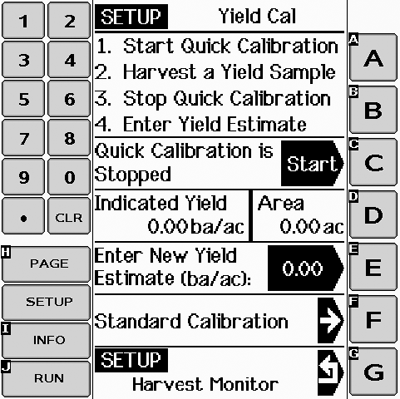
Quick Calibration
Screen: SETUP—YIELD CAL
Press: SETUP >> HARVEST MONITOR >> YIELD CALIBRATION
IMPORTANT: Before calibrating be sure that harvester basket is empty. Be sure boll buggy or cotton module is empty.
Procedure should be performed at maximum ground speed which operator expects to run in this crop and condition, and in an area that is reasonably level and of uniform yield.
If standard calibration is running estimated yield will be adding up because they are tied together.
If standard calibration has been performed operator does not need to run quick calibration process.
NOTE: Always read the text to the left of the START/STOP arrow. This explains the current status of calibration. Arrow changes back and forth between START and STOP. When yield calibration is stopped, START arrow is shown. When yield calibration is running, STOP arrow is shown.
STOP arrow—CALIBRATION IS RUNNING. Push button to STOP CALIBRATION.
START arrow—CALIBRATION IS STOPPED. Push button to START CALIBRATION.
-
Press START button.
NOTE: Pay close attention to area next to button C. When the black arrow states start, that means you have to press the button to start calibration. Area left of the arrow states if calibration is running or stopped.
-
Harvest a yield sample.
-
Press STOP button.
-
Enter yield estimate for sample just harvested.
Standard Calibration
PC12912CC-19-24OCT13
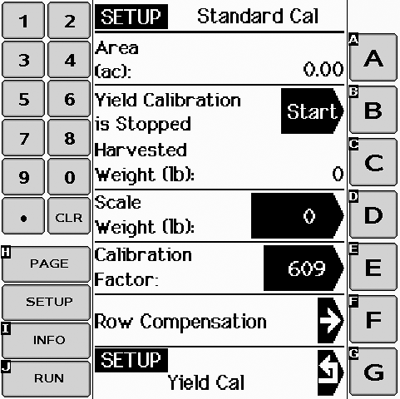
Standard Cal
Screen: SETUP—STANDARD CAL
Press: SETUP >> HARVEST MONITOR >> YIELD CALIBRATION >> STANDARD CALIBRATION
NOTE: Always read the text to the left of the START/STOP arrow. This explains the current status of calibration. Arrow changes back and forth between START and STOP. When yield calibration is stopped, START arrow is shown. When yield calibration is running, STOP arrow is shown.
STOP arrow—CALIBRATION IS RUNNING. Push button to STOP CALIBRATION.
START arrow—CALIBRATION IS STOPPED. Push button to START CALIBRATION.
-
Press START button.
-
NOTE: If Quick Calibration Procedure is started (on prior page) weight will count up on SETUP - STANDARD CAL screen.
Harvest a yield sample.
-
Press STOP button to end procedure.
-
Enter scale weight for sample just harvested.
Harvested Weight—Approximate weight of cotton that has been harvested during calibration process.
Scale Weight—Allows scale weight to be entered after a calibration run is complete. During calibration run, indicates approximate weight of cotton that has been harvested.
Calibration Factor—Allows mass flow sensor to read accurately. Value will be updated automatically by calibration procedure. This value can also be adjusted manually.
7760 Cotton Picker Round Module Calibration Instructions:
(Make sure the accumulator and bale chamber are empty before harvesting)
- Push START button.
- Harvest a yield sample of one to four round modules (Stop harvesting before completing the last full module).
- Press STOP button to end procedure (Empty accumulator and perform a manual wrap).
- Enter scale weight for sample just harvested (Use weight of round module or truck load for calibration weight).

PC12881-UN-24SEP10
Calibration Factor
Manual Adjustment of Calibration Factor
Screen: SETUP—STANDARD CAL
Press: SETUP >> HARVEST MONITOR >> YIELD CALIBRATION >> STANDARD CALIBRATION
NOTE: If scale weight is more than 50% higher or lower than displayed weight, system will not allow entry of scale weight. It is recommended that you review harvesting procedures and verify vehicle hauling cotton away from picker is also following correct procedures. At that time, repeat calibration procedures.
Do not change calibration factor in the middle of a field.
Always read the text to the left of the START/STOP arrow. This explains the current status of calibration. Arrow changes back and forth between START and STOP. When yield calibration is stopped, START arrow is shown. When yield calibration is running, STOP arrow is shown.
STOP arrow—CALIBRATION IS RUNNING. Push button to STOP CALIBRATION.
START arrow—CALIBRATION IS STOPPED. Push button to START CALIBRATION.
A new calibration factor can also be entered manually. To calculate calibration factor, divide weight shown on display by new weight on scale ticket. Multiply result by displayed calibration factor (see example below). This is the new calibration factor.
To manually enter a calibration factor:
-
Press CALIBRATION FACTOR button to change calibration factor.
-
Using numeric keypad, input calibration factor.
-
Press CALIBRATION FACTOR button to enter new value.
Displayed Calibration Factor (800) X New weight of cotton from scale ticket (4830) / Weight of cotton shown on display (5125) = New Calibration Factor (754)
Example:
Displayed Calibration Factor = 800
800 is factory default value for calibration factor.
Weight of cotton shown on display = 5125
New weight of cotton from scale ticket = 4830
New Calibration Factor = 754
|
CZ76372,0000182-19-20131024 |