Transfer Log
PC19936-19-21AUG14
PC17861CC-19-24OCT13
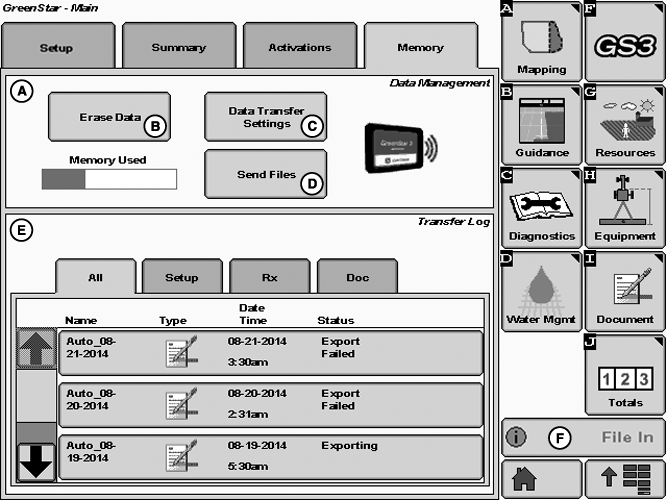
A - Data Management
B - Erase Data Button
C - Data Transfer Settings Button
D - Send Files Button
E - Transfer Log
F - File In or File Out Notification
Data Management (A)NOTE: Data is sent automatically when client, farm, or field change.
- Erase Data (B): Clear Transfer Log, Documentation Data, or All Data from display.
- Data Transfer Settings (C): Choose to send files on request or automatically.
-
Send Files (D): Send setup, documentation, and Harvest Identification,
Cotton (HID) files to MyJohnDeere. Maximum size for files sent using
Wireless Data Transfer (WDT) is 20 MB zipped. If Data Transfer Settings
are set to Automatic, and Send Files button is pressed shortly after
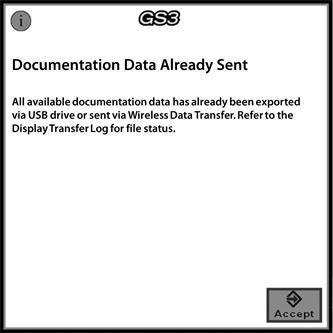
changing client, farm, or field, Documentation Data Already Sent alert
may appear.
Documentation Data Already Sent - All available documentation data has already been exported to USB drive or sent using Wireless Data Transfer. Refer to the Display Transfer Log for file status.
WDT and Machine Sync Compatibility
NOTE: WDT and Machine Sync cannot be utilized while Machine Sync is in Active, Tracking, or Ready state. Only Inactive state allows WDT to send and receive files.
Transfer Log (E)
- Select tabs to sort by file type.
-
File Status
- Processing File: File is being zipped on display and is in the process of being sent to modular telematic gateway (MTG).
- Exporting: File is in the process of being sent from MTG to MyJohnDeere. (Machine can be powered down and file transfer still occurs.)
- Exported: File has been received on MyJohnDeere.
- Ready to Use: File is available to apply to display or has been applied to display.
- A maximum of 200 file transfer records are kept in Transfer Log. Once more than 200 records have been reached in Transfer Log, the oldest records are removed.
- To prevent a memory full issue from occurring on display, periodically delete files from Transfer Log. Sending files wirelessly uses up display memory twice as fast. The file is saved to internal memory of display, and a copy of file is saved in Transfer Log so file can be resent at any time.
File In/File Out (F)
- Notification that a file has been transferred to or from display.
PC17060CC-19-24OCT13
PC17061CC-19-24OCT13
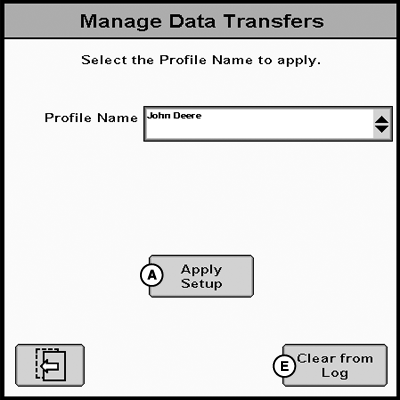
A - Apply Setup
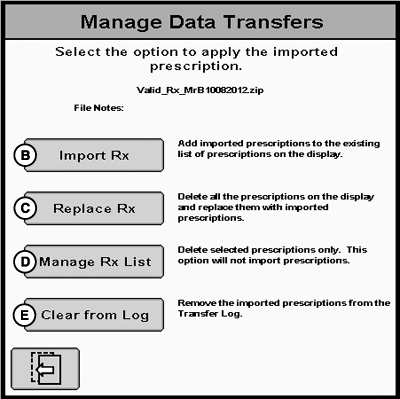
B - Import Rx
C - Replace Rx
D - Manage Rx List
E - Clear from Log
Manage File- Apply Setup (A): Apply setup file to display, which overwrites existing setup.
- Resend: Resend documentation, HID file, or setup file to MyJohnDeere.
- Import Rx (B): Add received prescriptions to existing prescriptions on display.
- Replace Rx (C): Delete all existing prescriptions on display, and replace with received prescriptions.
- Manage Rx List (D): Select and delete existing prescription on display.
- Clear from Log (E): Clear file from Transfer Log.
|
CZ76372,0000740-19-20141210 |