AutoTrac™ Tractors
Enabling System
The following criteria must be met for AutoTrac™ to be enabled:
- Machine has an AutoTrac™ capable steering controller (SSU).
- Hydraulic oil temperature is above 20°C (68°F).
- AutoTrac™ software activated (26-digit Activation Code).
- Track 0 has been set up.
- GPS signal status is present.
- TCM turned on.
Activating System
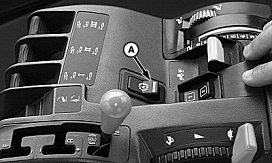
PC8629-UN-03AUG05
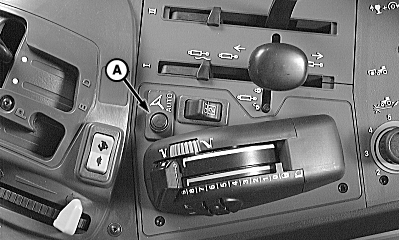
PC8868-UN-02NOV05
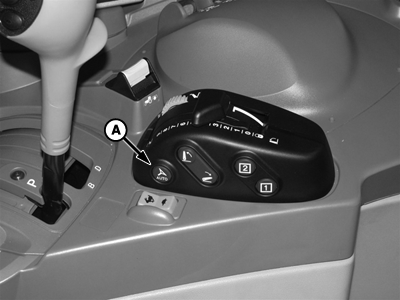
PC14812-UN-16MAR12
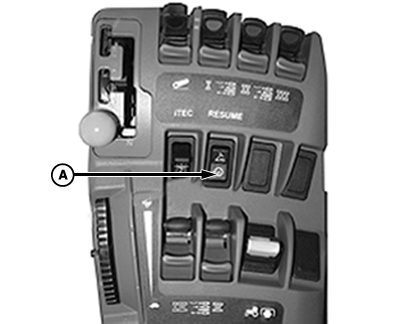
PC16925-UN-09MAY13
A - Resume Switch
 CAUTION: While AutoTrac™ is activated, operator is responsible
for steering at end of path and collision avoidance.
CAUTION: While AutoTrac™ is activated, operator is responsible
for steering at end of path and collision avoidance.
Do not attempt to turn on (Activate) AutoTrac™ system while transporting on a roadway.
After system has been Enabled, operator must manually change system to Activated status when steering assistance is desired.
NOTE: If it has been set, activating AutoTrac™ activates automatic power shift (APS). In 8020T and 9020T tractors, APS must be set up after enabling AutoTrac™. If AutoTrac™ is enabled after automatic power shift has been set, APS must be reset.
APS can be set either before or after enabling AutoTrac™ in 8010T tractors.
Press resume switch (A) to activate AutoTrac™. This initiates assisted steering.
NOTE: Resume switch location may vary depending on machine type, model, and year.
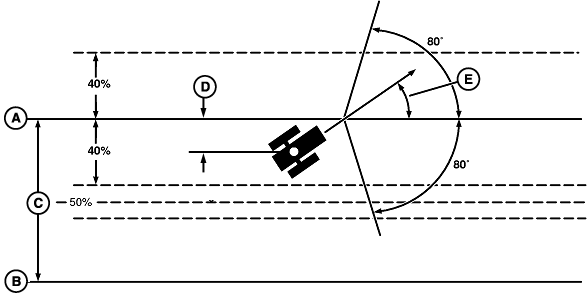
PC8866-UN-02NOV05
A - Track 0
B - Track 1 South
C - Track Spacing
D - Off-Track Lateral Error
E - Track Heading Error
Track number changes at 50% of row spacing.
Once tractor is at end of row operator must turn system to next pass. By turning steering wheel, AutoTrac™ is deactivated. Operator must turn onto next track.
AutoTrac™ can be activated by pressing resume switch only after the following conditions are met:
- Travel above 0.5 km/h (0.3 mph) for a minimum of 10 s, then system is capable of slow speed.
-
Forward vehicle speed is less than 30 km/h (18.6 mph).
NOTE: Minimum and maximum speeds allowed are controlled by the
tractor platform and the software version of the Steering Controller.
For a complete list of compatible tractors with this additional functionality,
visit deere.com.
- Reverse speed is less than 10 km/h (6.2 mph).
- Machine heading is within 80° of desired track.
- The machine is within 40% of track spacing.
- Operator is seated.
- TCM is on.
- In reverse AutoTrac™ remains activated for 45 seconds. After 45 s, the machine must be put in a forward gear before AutoTrac™ will activate.
Deactivating System
CAUTION: Always turn off (Deactivate and Disable) AutoTrac™
system before entering a roadway.
To turn off AutoTrac™ from Guidance View tab, toggle Steer On (Off) button until Steer Off is displayed.
Deactivating System
AutoTrac™ system can be deactivated by the following methods:
- Turning steering wheel.
-
Exceeding speed of 30 km/h (18.6 mph) or below 0.1 km/h (0.06
mph).
NOTE: Minimum and maximum speeds allowed are controlled by the
tractor platform and the software version of the Steering Controller.
For a complete list of compatible tractors with this additional functionality,
visit deere.com.
- Degradation of differential correction signal from SF1, SF2, or RTK to WAAS / EGNOS for longer than 3 minutes.
- Pressing Steer On (Off) button.
- Operator out of seat for more than 7 seconds.
- Activated in neutral longer than 30 seconds.
- In reverse for longer than 45 seconds.
- Reverse speed exceeds 10 km/h (6.2 mph).
|
AutoTrac is a trademark of Deere & Company |
HC94949,000093A-19-20151209 |