Universal Performance Monitor (UPM) Functionality

PC9047-UN-17APR06
Wheel

PC9048-UN-17APR06
Radar

PC9049-UN-17APR06
GPS
NOTE: Global positioning system (GPS) radar speed will be shown under the regular radar speed icon in advanced performance monitor (APM). No GPS option will display as the radar feed is designated by the radar wire feed connection behind the command center described later in this section.
Vehicle Speed
The operator will be able to view the vehicle speed and can select radar speed (if available), GPS speed (if available), or transmission wheel speed. The display readout will switch when below 0.3 km/h (0.2 mph) to 0.29 km/h (0.2 mph) and back to 1.1 km/h (0.7 mph) when above 1.0 km/h (0.6 mph).

PC9050-UN-17APR06
Front PTO

PC9051-UN-17APR06
Rear PTO
Front and Rear Power Takeoff (PTO) Revolutions Per Minute (RPM)The user is able to view both the front and rear PTO RPM (if available). The data will be displayed and rounded to the nearest tenths digit. This option is only available if the vehicle has the front and (or) rear PTO option.

PC9052-UN-17APR06
Wheel Slip
Wheel SlipThe operator is able to view the current wheel slip of the vehicle. Note that this feature will only be available if a radar sensor is installed. It will be displayed as a percentage calculated as the difference between the wheel speed and radar speed, divided by the wheel speed.

PC9053-UN-17APR06
Fuel Per Hour
Fuel Per HourIf available from the vehicle network, the operator is able to view the instantaneous fuel flow in gal/h (L/h). The output value is a computation that factors desired fuel quantity (not measured), current engine speed, cylinder size of the engine, and fuel density. This will then give the operator an idea of what range to expect for consumption.

PC9054-UN-17APR06
Fuel Per Area
Fuel Per AreaThe current fuel per area measurement (gal/area or L/h) will be shown on the screen. The value is based on current fuel usage, implement/header width, and speed. The area counter is enabled when the arrow is in the down position.

PC9055-UN-17APR06
Instantaneous Productivity
Instantaneous ProductivityInstantaneous Productivity is calculated from the vehicle speed and implement/boom/header width and is expressed in terms of area/hour. If recording is off, the area/hour value will be zero.

PC9056-UN-17APR06
Area Counter
Area CounterThe operator is able to select an area counter. The counter can be reset by the operator in the totals page. The PM will use the current implement width setting, the speed (priority is GPS speed, radar speed, wheel speed), and the recording status to count hectares/acres. If recording is off, area will not accumulate. If the value exceeds 9999.9, then the counter will reset to zero.

PC9057-UN-17APR06
Distance Counter
Distance CounterThe user will be able to view and reset the distance counter. This counter will accumulate any time the vehicle is moving (regardless of recording status) and will use the same speed as the area counter to calculate the distance. If the value exceeds 9999.9, then the counter will reset to zero.
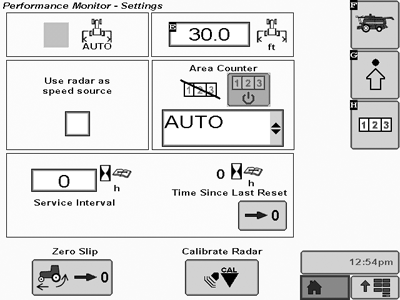
PC12687CC-19-24OCT13
UPM Setting Screen
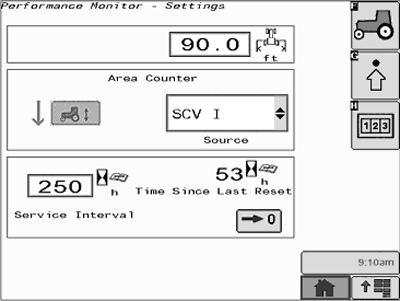
PC9076CC-19-24OCT13
APM Setting Screen
Settings ScreenThe setup screen of the Performance Monitor (PM) application, shown, contains a number of major sections that include settings that the operator can adjust and (or) calibrate. Each of these settings or calibration instructions are described in this section. Totals and Settings Screens will remain similar in both the APM and UPM applications. Resetting totals in APM mode will require the operator to depress and hold the reset button for 3 seconds.
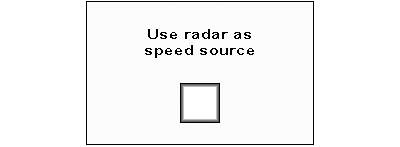
PC9095CC-19-24OCT13
Radar Connection
NOTE: If the machine that you are operating does not have radar make sure that the radar check box is not checked or inconsistent readings and alarms will be displayed.
Radar Connection
The operator is able to select or unselect a check box if the radar is directly connected to the display or not. This connection check box will not display when operating APM as it will automatically default to the radar feed using the connection behind the CommandCenter™.

PC9096-UN-17APR06
Implement/Header Width
Implement/Header WidthThe operator is able to enter and view the width of the implement/header. This value will remain in sync with the GreenStar™ Equipment implement width. This parameter will be used by the PM for area and productivity calculations.
Recording Sources for UPM / APM
The display will allow the operator to choose from an input list which source or function will indicate that recording is on or off. The PM will use this status to know when to engage the various measurements and this value will be in sync with the GreenStar™ Application.
|
CommandCenter is a trademark of Deere & Company GreenStar is a trademark of Deere & Company |
HC94949,000093B-19-20151209 |