Section Control On and Off Settings
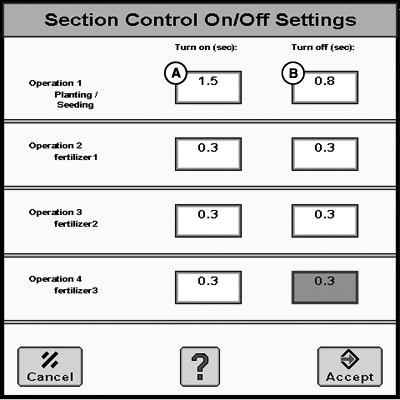
PC14943CC-19-24OCT13
A - Turn On Time (Sec.)
B - Turn Off Time (Sec.)
Turn on time (sec.) (A)–Defaults to 1, but can be changed between 0.3—15, in increments of 0.1 s.
Turn off time (sec.) (B)–Defaults to 0.6, but can be changed between 0.3—15, in increments of 0.1 s.
The operator can adjust the turn on and turn off settings to fit a specific machine. The turn on and turn off settings are to compensate for average physical machine reaction time (electrical and mechanical) for applying product. Keep in mind that the reaction time does not increase as ground speed increases. The physical reaction time remains constant for that machine configuration. The machine travels more, or less, distance while the reaction is taking place at different ground speeds.
NOTE: It is not recommended to utilize the turn on and turn off times to achieve intentional overlap. This overlap can cause additional system complications. To achieve increasing amounts of overlap, utilize the Percent Overlap between 100—125%. This overlap allows the operator to achieve desired results and prevent skips by creating intentional overlap.
If the turn on time is set to 0.3 s, the command signal is sent when the system estimates the section to be 0.3 s from the boundary or uncovered area. The coverage map begins painting 0.3 s after the command signal is sent. If the actual machine reaction time is 0.8 s, the machine travel 0.5 s past the boundary or into the uncovered area before applying. In this situation the coverage map began painting before the actual application started, therefore the two did not match.
As the turn on time increases, the command signal is sent earlier as the boundary or non-covered area is approached. If the turn on time is 1.0 s, the command is sent 1.0 s before the implement is expected to reach the boundary or previously covered area. The coverage map will start painting 1.0 s after the command signal is sent. Section Control expects the machine to begin applying at this time as well because the operator entered a turn on time of 1.0 s.
The more constant the ground speed is kept when entering or exiting boundary or previous coverage area, the more accurate Section Control is. If the machine speed is drastically changing speeds while entering or exiting a boundary or previous coverage area, Section Control cannot anticipate that change because it estimates your turn on and off position based on current position, direction, and speed.
Once a machine’s turn on and turn off time is determined, it remains the same unless a dramatic system change is made to the machine. For example, a change in system plumbing affects the average physical machine reaction time.
NOTE: When using multiple Section Control capable control units, the turn on or off time is most accurate at the primary operation (location of implement offsets). All other operations are less accurate.
Each operation can be assigned its own On and Off time. Set the primary operation on and off time using the directions. For the secondary operations, follow the directions and then adjust as necessary to compensate for distance from primary operation and the distance traveled by the implement. Speed greatly influences secondary operation on and off times. Keep this in mind when adjusting the times for secondary operations.
NOTE: See the Understanding Section Control Turn On and Turn Off Settings later in this section for examples of turn on and off times when multiple applications exist.
|
HC94949,000093F-19-20151209 |