MACHINE and IMPLEMENT Tabs
MACHINE tab allows setup of the following:
- Machine Type—Used to select machine type.
- Machine Model—Used to distinguish between different models.
- Machine Name—Used to distinguish between multiple machines of the same model.
- Connection Type—Drawbar or 3 pt. hitch.
- Machine Turn Radius
- Turning Sensitivity
- Recording Source—Used to determine when recording turns on-off.
- Machine Offset—Used to eliminate skips or overlaps due to an offset receiver.
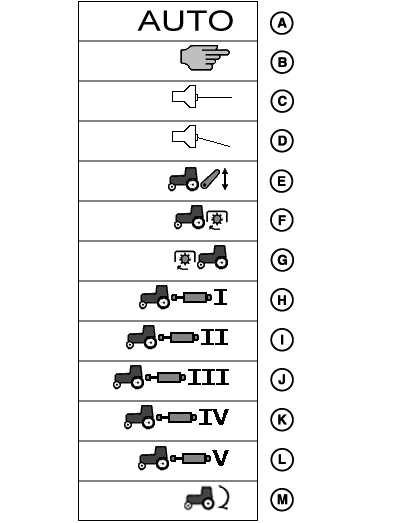
PC17334-UN-23OCT13
Recording Source
A - Automatic (from controller)
B - Manual Recording ON/OFF
C - Implement Switch Open
D - Implement Switch Closed
E - 3-point Hitch
F - Rear PTO
G - Front PTO
H - SCV 1
I - SCV 2
J - SCV 3
K - SCV 4
L - SCV 5
M - AccuDepth
NOTE: Not all recording sources are available for all machines. Many recording sources require ground speed.
Recording Source
NOTE: If Manual Mode is selected, the operator must push the Record or Pause Button to turn recording on or off for Documentation and Coverage Maps.
The following control units can be used with AUTO to turn recording on and off automatically :
- John Deere Harvest Monitor
- John Deere SeedStar™ for Air Carts
- John Deere SeedStar Gen 2 Monitor or Variable Rate Drive for Planters
- John Deere SprayStar™ Gen 4
- John Deere Central Insecticide System
- Raven™ 440, 450, 460, 660
- SideKick
- GreenSeeker™
- Rawson™ Accu-Rate™ and Accu-Plant™
- New Leader™ Mark III and Mark IV
- Dickey-John™ Seed Manager
- Vanguard™ PIC Seed Monitor
- Task Control Unit compliant implements
NOTE: Dual Variety Function cannot be used with a three motor VRD planter.
PTO, Hitch, and SCV can be used as a recording source on certain vehicles only.
AccuDepth™ icon only appears when an AccuDepth-controlled implement is connected. SCV Recording will not allow recording; use AccuDepth icon as recording source.
IMPLEMENT tabs allow setup of the following:
- Implement Type—Used to select machine type.
- Implement Model—Used to distinguish between different models.
-
Implement Name—Used to distinguish between multiple machines
of the same model.
The following settings of the implement are saved with implement name:
- Unique identifier of the implement (which will be shown as implement name)
- Turn ON/OFF times for Section Control
- Offsets/dimensions of the implement
- Implement GPS receiver offsets
- Physical width
- Implement width
- In ground turn radius
- Track spacing
- Connection type (will not be transferred to Apex™ )
These settings will automatically display when an implement name gets manually selected or an ISO implement is detected. See implement detection section of this Manual for more information.
For more information, see MACHINE AND IMPLEMENT SETUP section.
|
SeedStar is a trademark of Deere & Company SprayStar is a trademark of Deere & Company Raven is a trademark of Raven GreenSeeker is a trademark of NTech Industries, Inc. Rawson is a trademark of Rawson Accu-Rate is a trademark of Rawson Accu-Plant is a trademark of Rawson New Leader is a trademark of New Leader Dickey-John is a trademark of Dickey-John Vanguard is a trademark of Vanguard AccuDepth is a trademark of Deere & Company Apex is a trademark of Deere & Company |
HC94949,0000950-19-20151209 |