Activation and License
PC17360-UN-25FEB14
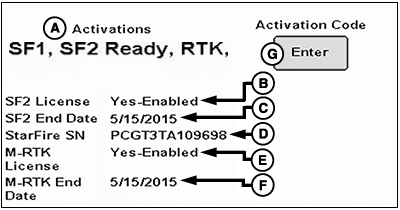
StarFire 3000 Main—Activations Tab
A - Activations
B - SF2 License
C - SF2 End Date
D - StarFire SN
E - M–RTK License
F - M–RTK End Date
G - Activation Code Enter Button
Activations (A) for receiver:
- SF1 — Activated on every StarFire™ 3000 Receiver.
- SF2 Ready — SF2 Ready activation is required before activating Real Time Kinematic (RTK), and is required to use an SF2 or Mobile RTK (M-RTK) license. Receiver can either be ordered SF2 Ready, or an SF2 Ready upgrade can be purchased.
- RTK — Activated with valid RTK activation (requires SF2 Ready).
SF2 License (B): Displays status of SF2 license of receiver, such as:
- Yes-Enabled — A valid SF2 license exists and SF2 is the differential correction mode selected.
- Yes-Disabled — A valid SF2 license exists, but SF2 is not the differential correction mode selected.
-
No — No valid SF2 license exists or SF2 license has expired.
NOTE: With John Deere Mobile RTK, SF2 fallback function is included
and an SF2 license is not required.
SF2 End Date (C): Displays date when SF2 license expires.
StarFire SN (D): Receiver serial number.
M–RTK License (E): Displays M–RTK license status of receiver, such as:
- Yes-Enabled — A valid M–RTK license exists, and M–RTK is selected as the differential correction mode.
- Yes-Disabled — A valid M–RTK license exists, and M–RTK is not selected as the differential correction mode.
- No — No valid M–RTK license exists or M–RTK license has expired.
M–RTK End Date (F): Displays date when M–RTK license expires.
PC17364-UN-22JAN14
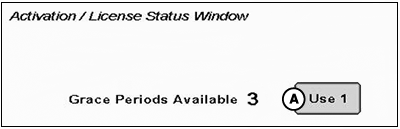
A - Use Grace Period Button
Activation / License Status Window
Messages are displayed when SF2 license has expired.
Option to use a grace period is provided.
NOTE: Three 24 hour grace periods are available when a current license expires. These periods allow sufficient time for operator to renew a license. Grace periods provide SF2 differential correction signal.
To use a grace period:
- Select Use 1 button (A).
- Select Yes button.
PC9708-UN-10NOV06
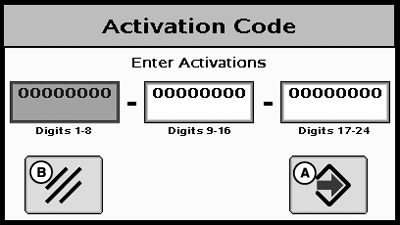
Activation Code
A - Enter button
B - Cancel button
Activation Code
NOTE: A 24-digit activation code is generated on StellarSupport.com. Contact your John Deere dealer for support.
Activation codes provide SF2 Ready and RTK activations, and SF2 and M–RTK licenses.
Select Enter button to input 24-digit codes for SF2 Ready and RTK activations, SF2 and M–RTK licenses, and deactivation codes for transferring all activations and licenses.
-
After selecting Enter button, an Activation Code box appears
with three input boxes.
NOTE: If more than eight digits are entered into an input box,
99999999 appears. Reselect box and type only eight digits into input
box.
- Select first input box labeled Digits 1-8, and enter first eight digits of 24-digit code.
- Select second input box labeled Digits 9-16, and enter second eight digits of 24-digit code.
- Select third input box labeled Digits 17-24, and enter last eight digits of 24-digit code.
- Select Enter button (A).
- If 24-digit code is valid and entered correctly, a confirmation message appears.
Deactivation Code Input
Deactivation codes are input the same as activation codes. Six-digit return codes for SF2 Ready and RTK activations, and SF2 and M–RTK licenses are displayed after deactivation code is entered. These codes are needed when transferring activations or licenses to another receiver.
|
StarFire is a trademark of Deere & Company |
CZ76372,0000684-19-20140225 |