Overview:
SF2/RTK Activations,
SF2 Subscription
PC12065-UN-12MAY09
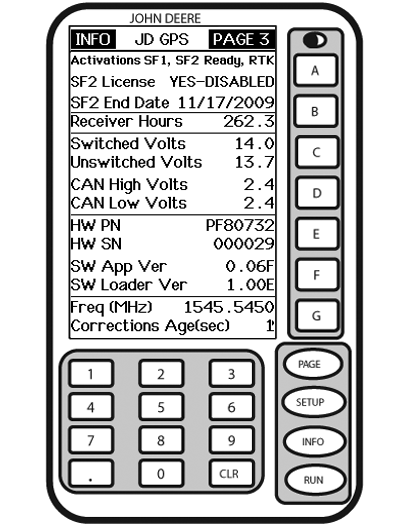
INFO - GPS - PAGE 3
A - Activations SF1, SF2 Ready, RTK
SF2 License
YES—DISABLED
B - SF2 End Date
Receiver Hours
C - Switched Volt
Unswitched Volt
D - CAN High Volt
CAN Low Volt
E - Hardware Part Number
Hardware Serial Number
F - Software Application Version
Software
Loader Version
G - Frequency (MHz)
Corrections Age (sec)
StarFire 3000 is offered in 2 configurations: SF1 World Solution and SF2 Ready.
SF1 World Solution: SF1 is a no-charge satellite-based differential correction signal offered exclusively by John Deere, delivering accuracy adequate for non row crop applications. SF1 StarFire 3000 can be upgraded to SF2-Ready by visiting your John Deere dealer or www.StellarSupport.com and purchasing SF2 Ready activation.
NOTE: Serial port GPS information (NMEA) is only outputted for SF1 when connected to a GreenStar system.
SF2 Ready: SF2 is a +/- 5 cm (2 in.) pass to pass differential correction signal provided exclusively by John Deere. While StarFire 3000 can be ordered SF2 Ready, SF2 Ready activation must be obtained by visiting www.StellarSupport.com (COMAR order number and receiver serial number are needed) and manually entered into receiver. Once activation has been entered, SF2 license can be purchased for either a few months or a few years.
NOTE: StarFire 3000 must be SF2 Ready prior to upgrading receiver to RTK.
RTK: RTK us the highest accuracy correction signal. It requires use of a local base station and radio communication equipment. Each receiver used in the RTK system must be activated for RTK. This activation exists for the life of the receiver and can be transferred.
i
Obtaining and Entering SF2 or RTK activation and SF2 license
-
NOTE: Receiver serial number is required to obtain SF2 Ready or RTK activation codes. SF2 Ready and RTK also require corresponding COMAR order number if purchased from your John Deere dealer.
Press: INFO >> StarFire 3000 >> PAGE >> PAGE
Locate serial number (Hardware SN).
-
NOTE: A 24-digit activation code will be provided by www.StellarSupport.com either through postal service or E-mail.
For RTK customers only: RTK activation is purchased as part of each RTK base station and vehicle bundle. To obtain 24 digit RTK activation code, visit StellarSupport.com and provide COMAR order number for RTK system and receiver serial numbers.
Login to www.stellarsupport.com to obtain activation code.
-
NOTE: Enter 24 digit activation code number in three cells that have eight zero digits.
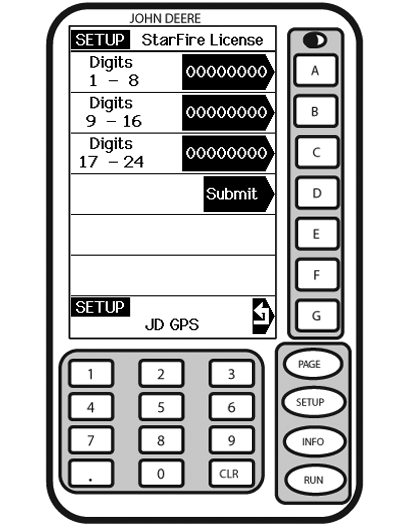
PC12116-UN-09JUN09SETUP - STARFIRE LICENSE
A - Digits 1-8
B - Digits 9-16
C - Digits 17-24
D - Submit
E - —
F - —
G - Return to GPS
Screen: SETUP - STARFIRE LICENSEPress: SETUP >> StarFire 3000 >> LICENSE/ACTIVATE
Press letter button next to DIGITS 1—8 and enter first eight digits of activation code. Press letter button next to DIGITS 1—8 again to enter value.
-
Press letter button next to DIGITS 9—16 and enter second eight digits of activation code. Press letter button next to DIGITS 9—16 again to enter value.
-
Press letter button next to DIGITS 17—24 and enter last eight digits of activation code. Press letter button next to DIGITS 17—24 again to enter value.
-
Press letter button next to SUBMIT.
-
Press letter button next to SETUP to return or SETUP button to continue setup operations.
License Expired Alarm
NOTE: Three 24 hour grace periods are available when current license expires. This is provided to allow sufficient time for customer to renew a license. Grace period signal will be SF 2 differential correction signal.
If license expires while operating or since last operated, an alarm screen will appear.
Alarm screen can be cleared by pressing letter button next to CONTINUE or a grace period can be activated by pressing letter button next to USE 1 if needed.
|
HC94949,0000069-19-20120516 |