Manual Software Update
-
NOTE: Whenever new or revised software programs are available, it will be necessary to load new software to system.
Use this procedure if automatic software load does not work.
To acquire latest version of software, visit www.stellarsupport.com or contact your John Deere dealer.
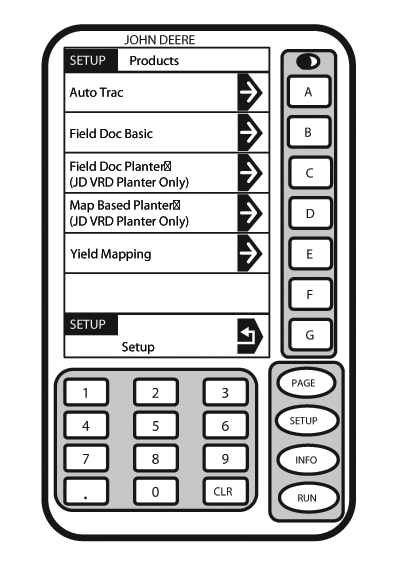
PC9559-UN-12MAY09SETUP - PRODUCTS
A - Auto Track
B - Field Doc Basic
C - Field Doc Planter
D - Map Based Planter
E - Yield Mapping
F - —
G - Setup Return
Install KeyCard containing new software in top slot of mobile processor. -
Turn ignition key to RUN position.
-
NOTE: To cancel new software load press G.
Press: SETUP >> KEYCARD
Press letter button next to desired selection on SETUP - PRODUCTS screen.
-
Wait until WARNING PROGRAMMING screen appears and follow directions on screen.
DO NOT REMOVE PC CARD
DO NOT REMOVE POWER
-
Press letter button next to OK.
-
You may proceed as usual.
|
JS56696,0000562-19-20090710 |