Differential Correction Setup
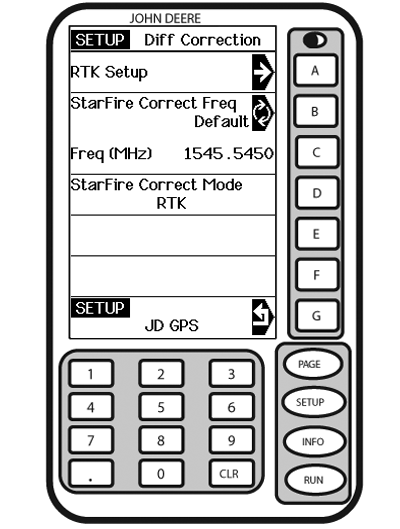
PC12071-UN-12MAY09
SETUP - DIFF CORRECTION
A - RTK Setup
B - StarFire Correction Frequency, Default
C - Frequency
D - StarFire Correction Mode
E - —
F - —
G - Return to GPS Setup
Differential correction is the process by which GPS accuracy is improved. (See OVERVIEW: SF1/SF2 ACTIVATIONS, SF2 SUBSCRIPTION in this section.)
Screen: SETUP - DIFF CORRECTION
Press: SETUP >> StarFire 3000 >> DIFF CORRECTION SETUP
(See RTK section for RTK Setup.)
IMPORTANT: DO NOT change default StarFire Correction Frequency unless instructed to do so by your John Deere Dealer or by John Deere Ag Management Solutions.
NOTE: Some information will only appear when receiver has a license.
Press letter button next to STARFIRE CORRECT FREQ to toggle between DEFAULT and BELOW.
When STARFIRE CORRECT FREQ is set to BELOW—press letter button next to FREQ (MHz) then input a frequency.
Press letter button next to STARFIRE CORRECTION to toggle between OFF, SF1, and SF2. If toggled to OFF, StarFire will not receive SF1 or SF2 correction signals. If receiver does not have a valid SF2 license then SF2 will not appear on screen.
NOTE: Default refers to Auto-Select StarFire frequency.
|
JS56696,000056D-19-20090710 |