Modem and Network Configuration
PC22003-UN-11JAN16
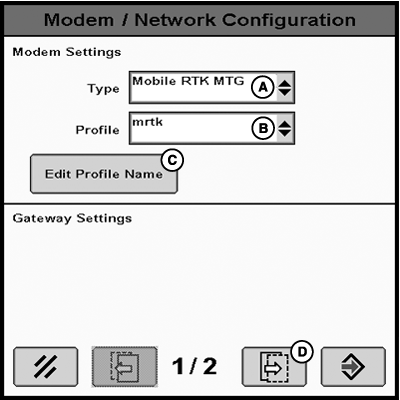
Modem and Network Configuration Page 1 of 2
A - Type
B - Profile
C - Edit Profile Name Button
D - Next Page Button
Modem Settings:
- Type (A): Defines modem type. Select Mobile RTK MTG.
- Profile (B): Defines profile name. Default is NEW.
- Edit Profile Name (C): Select button to input a profile name.
Select Next Page button (D) to access Modem and Network Configuration Page 2.
PC22004-UN-11JAN16
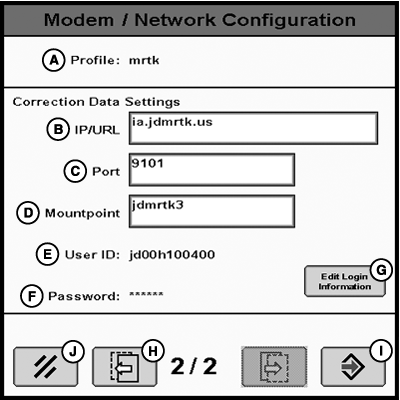
Modem and Network Configuration Page 2 of 2
PC17372-UN-23JAN14
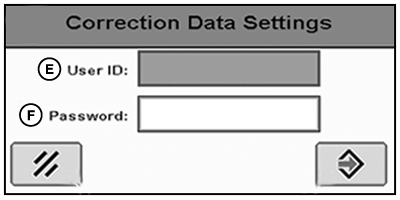
Correction Data Settings
A - Profile
B - IP/URL
C - Port
D - Mountpoint
E - User ID
F - Password
G - Edit Login Information Button
H - Previous Page Button
I - Enter Button
J - Cancel Button
- Profile (A): Modem profile name defined on previous page.
Correction Data Settings:
-
IP/URL (B): Input domain name provided
by correction data provider (xx.jdmrtk.yy).
- xx = state or province abbreviation
- yy = country abbreviation
For example, Iowa, US is ia.jdmrtk.us or Ontario, CA is on.jdmrtk.ca.
- Port (C): Input port number provided by correction data provider (for example, 9101).
- Mountpoint (D): Input virtual reference station provided by correction data provider (for example, jdmrtk3).
- User ID (E): Displays user identifier (for example, JD+PCGT3TA123456).
- Password (F): Displays hidden password characters as asterisks (****).
- Edit Login Information (G): Select button to display Correction Data Settings page. Enter User ID (E) and Password (F) provided by correction data provider.
(For more Correction Data Settings information, reference http://connect.jdmrtk.com.)
Select Previous Page button (H) to access Modem and Network Configuration page 1.
Select Enter button (I) to store all settings or Cancel button (J) to abort setup.
|
RW00482,0000581-19-20160125 |