Mobile RTK Page
PC22083-UN-25JAN16
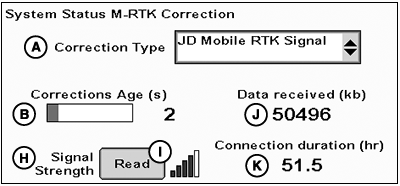
System Status M-RTK Correction
PC22084-UN-25JAN16
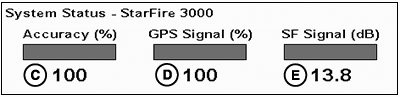
System Status - StarFire 3000
PC22085-UN-25JAN16
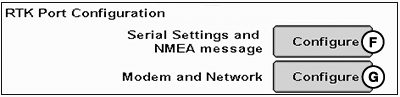
RTK Port Configuration
A - Correction Type
B - Correction Age
C - Accuracy (%)
D - GPS Signal (%)
E - SF Signal (dB)
F - Configure Serial Settings and NMEA Message Button
G - Configure Modem and Network Button
H - Signal Strength
I - Read Button
J - Data Received (kb)
K - Connection Duration (hr)
System Status M–RTK Correction:
-
Correction Type (A):
Operator must select one of the following mobile real time kinematic (M-RTK) correction sources:
- Off
- JD Mobile RTK Signal
-
Corrections Age (B): Indicates M-RTK
correction data stream during maximum correction message age (MCMA).
NOTE: Status bar is green when M-RTK correction is streaming.
It is red when M-RTK correction streaming is not detected during MCMA.
If status bar is displayed in red while StarFire™ 3000 status bars (C, D, and E) are displayed in green, there is a problem with M-RTK. Check settings (Correction Type [A] and RTK Port Configuration [F and G]) and contact your John Deere dealer.
- Signal Strength (H): Indicates cellular signal strength of current location. Select Read button (I) to get the current cellular signal strength.
- Data Received (kb) (J): Indicates total kilobytes (kb) of data received. Calculation starts once connection is accepted and used by receiver.
-
Connection Duration (hr) (K): Indicates
duration in hours (hr) of connection. Calculation starts once connection
is accepted and used by receiver.
NOTE: If correction messages are not recognized or received,
Data received (J) and Connection duration (K) totals do not accumulate.
System Status - StarFire™ 3000:
NOTE: Global positioning system (GPS) Accuracy (C), GPS Signal (D), and SF Signal (E) are also displayed on Main softkey > Info tab.
-
GPS Accuracy Indicator (GPS AI) (C): GPS AI displays percentage (0-100%) of GPS position accuracy achieved
by receiver.
When receiver is initially powered, GPS AI displays 0 percent. As receiver acquires satellites and calculates a position, GPS AI increases as accuracy improves. Acceptable guidance performance for Parallel Tracking™ and AutoTrac™ is achieved when GPS AI displays 80 percent or greater. This may take up to 20 minutes. Many factors affect GPS accuracy. If 80 percent accuracy or greater is not achieved within 25 minutes, consider the following possibilities:
- Obstructed view of sky — Trees, buildings, or other structures may block GPS signal from available satellites.
- L1/L2 signal to noise ratio (SNR) — Radio interference from 2-way radios or other sources may cause low SNR (Satellites softkey > Graph tab).
- Satellite position in sky — Poor GPS satellite geometry can reduce accuracy (Satellites softkey > Sky Plot tab).
- Number of satellites above elevation mask — Total number of GPS satellites available to receiver that are above seven degrees elevation mask (Satellites softkey > Sky Plot tab).
-
Number of satellites in solution — Total number of satellites
used by receiver to calculate a position (Satellites softkey > Sky
Plot tab).
- GPS Signal (D): Displays quality of signal received from constellation of GPS satellites.
- SF Signal (E): Displays quality of differential correction signal received from correction satellites.
RTK Port Configuration:
- Select Configure button (F) to setup recommended standard 232 (RS232) serial port setting and National Marine Electronics Association (NMEA) message.
-
Select Configure button (G) to setup modem and network.
(Reference Modem and Network Configuration for more information.)
|
StarFire is a trademark of Deere & Company Parallel Tracking is a trademark of Deere & Company AutoTrac is a trademark of Deere & Company |
RW00482,0000582-19-20160126 |