Position Machine and Calibrate Terrain Compensation Module (TCM)
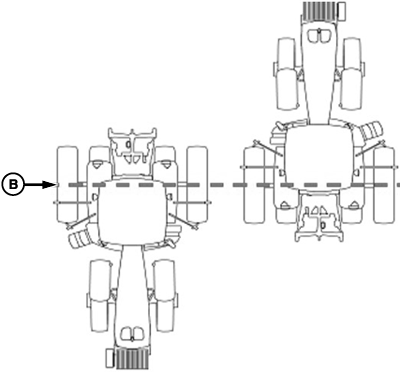
PC19995-UN-03SEP14
Floating Front Axle Machines
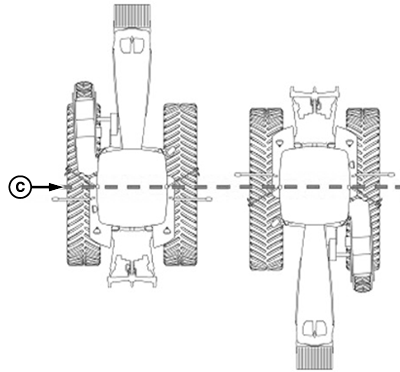
PC19996-UN-03SEP14
Fixed Axle Wheels Or Tracks Machines
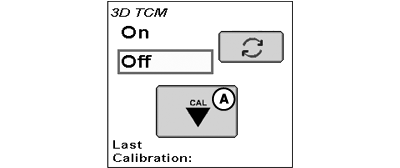
PC19994-UN-04SEP14
A - Calibration Button
B - Rear Axle
C - Machine Pivot Point
- Park machine on a hard, level surface and come to a complete stop (cab is not rocking).
- Mark location of tires or tracks on ground to note location of axle.
- Select Calibration button (A).
- Select Enter button. Calibrating status bar appears, then disappears when finished.
-
Drive forward, and turn machine 180 degrees to face opposite
direction. Ensure tires are in proper location for fixed or floating
front axle and machine has come to a complete stop (cab is not rocking).
- For floating front axle machines (MFWD (mechanical front wheel drive), ILS™ (Independent Link Suspension), TLS™ (Triple-Link Suspension), place wheels so rear axle (B) is in same location when performing 2-point calibration.
- For fixed-axle wheels or tracks machines (track tractors, self-propelled sprayers, and 4-wheel drive tractors), place wheels or tracks so machine pivot point (C) is in same location when facing either direction.
- Select Enter button. Calibrating status bar appears, then disappears when finished.
- Select Enter button to return to Setup tab. If calibration was unsuccessful, re-calibrate the TCM.
|
ILS is a trademark of Deere & Company TLS is a trademark of Deere & Company |
HC94949,000082C-19-20150828 |