Enter Activation Code
-

PC21370-UN-16JUL15Enter Button
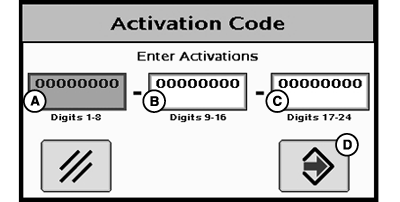
PC21371-UN-16JUL15A - Digits 1–8 Input Box
B - Digits 9–16 Input Box
C - Digits 17–24 Input Box
D - Accept Button
Select Enter and Activation Code popup appears with three input boxes. NOTE: If more than 8-digits are entered into an input box, “99999999” appears. Reselect box and type only 8-digits into input box.
- Select Digits 1-8 input box (A), and enter first 8-digits of 24-digit code.
- Select Digits 9-16 input box (B), and enter second 8-digits of 24-digit code.
- Select Digits 17-24 input box (C), and enter last 8-digits of 24-digit code.
- Select Accept (D).
- A confirmation message appears when a valid 24-digit code is correctly entered.
|
HC94949,000083B-19-20150828 |