Adjust Alarms

PC8663-UN-29APR15
Menu Button

PC22295-UN-21MAR16
John Deere Rate Controller 2000 Button

PC22296-UN-21MAR16
Setup Softkey
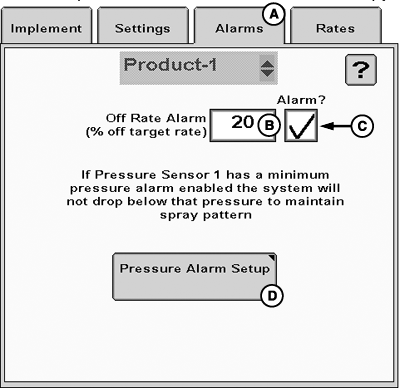
PC22345-UN-24MAR16
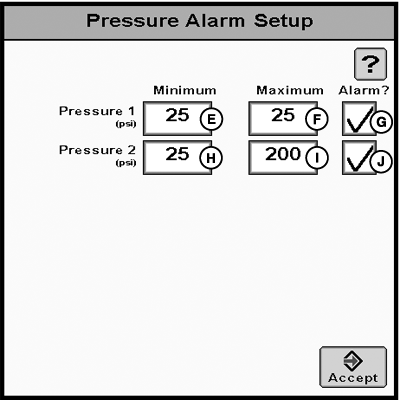
PC22346-UN-24MAR16
A - Alarms Tab
B - Off Rate Alarm
C - Off Rate Alarm Checkbox
D - Pressure Alarm Setup Button
E - Pressure Sensor 1 Minimum
F - Pressure Sensor 1 Maximum
G - Pressure Sensor 1 Alarm Checkbox
H - Pressure Sensor 2 Minimum
I - Pressure Sensor 2 Maximum
J - Pressure Sensor 2 Alarm Checkbox
Alarms tab (A) allows operator to change alarm settings after creating a profile with the setup wizard.
-
Select Menu button.
-
Select John Deere Rate Controller 2000 button.
-
Select Setup softkey.
-
Select Alarms tab (A).
- Off Rate Alarm (B)
- Off Rate Alarm checkbox (C)
-
Pressure Alarm Setup button (D)
- Pressure Sensor 1 Minimum (E)
- Pressure Sensor 1 Maximum (F)
- Pressure Sensor 1 Alarm checkbox (G)
- Pressure Sensor 2 Minimum (H)
- Pressure Sensor 2 Maximum (I)
- Pressure Sensor 2 Alarm checkbox (J)
|
RW00482,0000640-19-20160412 |